

1. 簡介
隨著 AI 代理承擔更多責任,單一代理要完成所有工作,維護、擴充及演進都會變得困難。不同功能通常需要不同的部署策略、更新週期,甚至由不同團隊負責。
- A2A (Agent2Agent) 通訊協定可解決通訊問題,讓代理能以標準方式探索彼此的功能,並跨架構和機構協作。
- Gemini Enterprise Agent Platform Runtime 解決了部署問題,這個全代管無伺服器平台可代管代理程式,並內建 A2A 支援、自動調整資源配置、安全端點、持續性工作階段,以及零基礎架構管理。
您可以使用這些工具建構專用代理、將代理部署為可探索的 A2A 服務,並將代理組合成多代理系統。
建構項目
訂位代理:使用 ADK 工作階段狀態管理餐廳訂位 (建立、查看及取消),而 ADK 工作階段狀態則由 Gemini Enterprise Agent Platform Sessions 管理。您可將這個代理部署至 Gemini Enterprise Agent Platform Runtime,透過 A2A 通訊協定的代理資訊卡探索。接著,您會升級 Foodie Finds 餐廳服務專員代理程式 (來自必要程式碼研究室,如果您尚未完成該程式碼研究室,請別擔心,我們已為您準備好入門存放區),將預訂代理程式做為遠端 A2A 子代理程式使用。結果:多代理系統,調度器會將菜單查詢轉送至 MCP Toolbox,並將預訂要求轉送至遠端 A2A 代理。
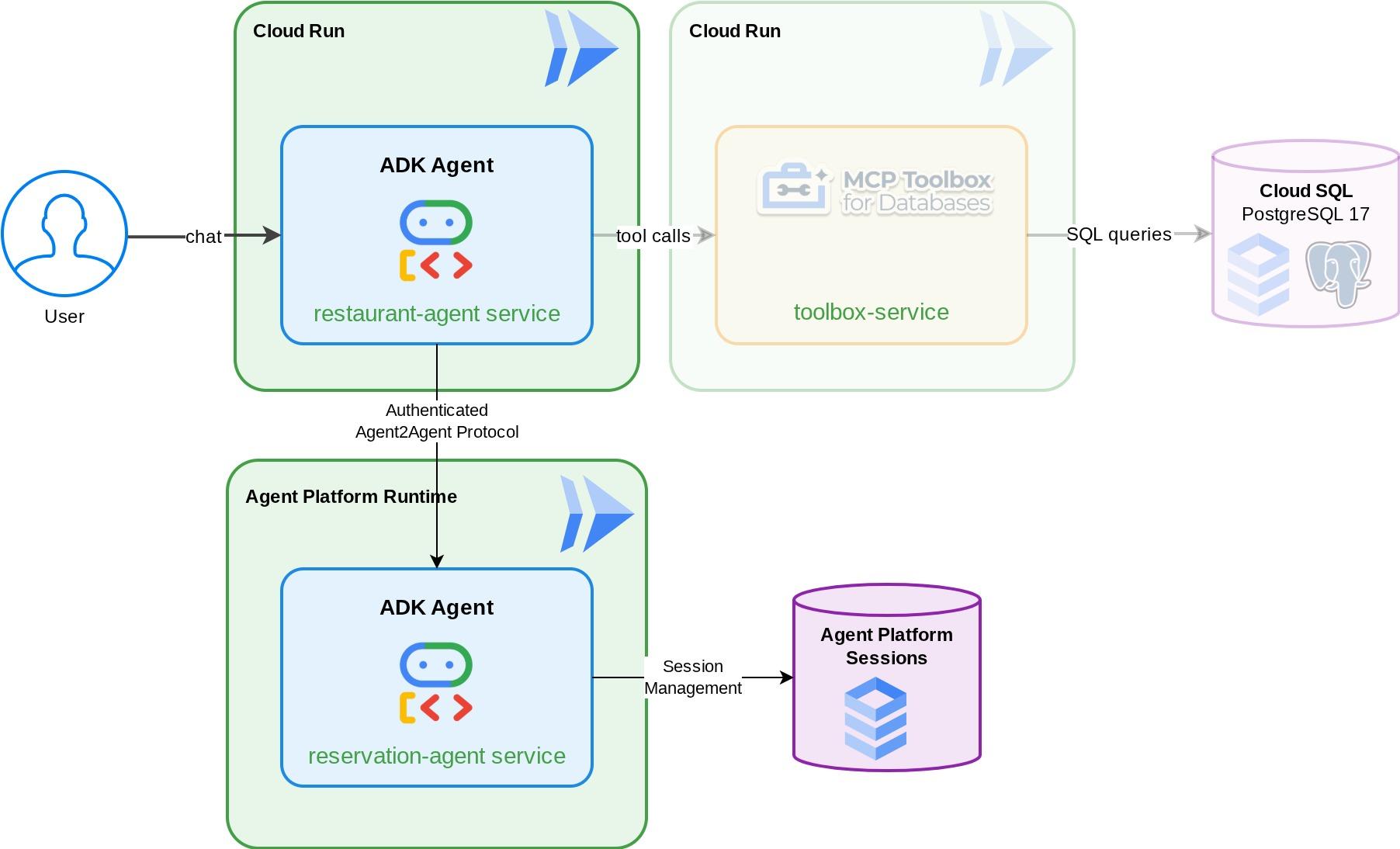
課程內容
- 建構 ADK 代理,使用代管工作階段服務管理預訂資料
- 將 ADK 代理公開為 A2A 伺服器,並提供代理資訊卡和技能
- 將 A2A 代理部署至 Gemini Enterprise Agent Runtime
- 使用
RemoteA2aAgent從另一個 ADK 代理取用遠端 A2A 代理,並處理通過驗證的要求 - 逐步測試多代理系統:本機 A2A、已部署的 A2A、部分整合、完整部署
必要條件
- (建議) 完成下列程式碼研究室:
- 使用 ADK 和 CloudSQL 建構持續性 AI 代理 -> 進一步瞭解 ADK 工作階段和狀態
- 運用 ADK、MCP Toolbox 和 Cloud SQL 建構代理式 RAG - 您可以繼續從這個程式碼實驗室建構代理程式,提供的範例程式碼完全相同
- 具備有效帳單帳戶的 Google Cloud 帳戶
- 對 Python 和 ADK 概念有基本的瞭解
2. 環境設定 - 接續先前的程式碼研究室
本程式碼研究室提供的敘事內容,實際上是這個先決條件程式碼研究室:運用 ADK、MCP Toolbox 和 Cloud SQL 建構代理式 RAG 的延續。您可以繼續先前的程式碼研究室
我們可以在先前的程式碼研究室目前使用的目錄 ( 目前使用的目錄應為 build-agent-adk-toolbox-cloudsql ) 中開始建構。為避免混淆,請將目錄重新命名為我們從頭開始時使用的目錄名稱
mv ~/build-agent-adk-toolbox-cloudsql ~/adk-a2a-agent-runtime-starter
cloudshell workspace ~/adk-a2a-agent-runtime-starter && cd ~/adk-a2a-agent-runtime-starter
source .env
確認先前程式碼研究室中的重要檔案是否到位:
echo "--- Restaurant Agent ---"
cat restaurant_agent/agent.py | head -5
echo ""
echo "--- Toolbox Config ---"
cat tools.yaml | head -5
您應該會看到含有 LlmAgent 匯入內容的 restaurant_agent/agent.py 檔案,以及含有 Toolbox 設定的 tools.yaml。
接著,重新初始化 Python 環境
rm -rf .venv
uv sync
此外,也請確認資料庫已完成播種並準備就緒:
uv run python scripts/verify_seed.py
如果您按照先前程式碼研究室中的各項測試詳細資料操作,可能會看到類似下方的輸出內容
Menu Items: 16/15
Embeddings: 16/15

✗ Database not ready
沒關係!資料庫檢查不會將您從資料擷取檢查輸入的額外資料納入考量。只要有 15 筆以上的資料,就沒問題!
啟用必要 API
接著,我們需要確保已啟用必要 API,才能與 Gemini Enterprise Agent Platform 互動
gcloud services enable \
  cloudresourcemanager.googleapis.com
您應該已備妥必要檔案和基礎架構,可繼續前往下一節:A2A Protocol and Gemini Enterprise Agent Runtime!
3. 環境設定 - 使用入門儲存空間重新開始
這個步驟會準備 Cloud Shell 環境、設定 Google Cloud 專案,並複製範例存放區。
開啟 Cloud Shell
在瀏覽器中開啟 Cloud Shell。Cloud Shell 提供預先設定的環境,內含本程式碼研究室所需的所有工具。系統提示時,按一下「授權」
然後依序點選「View」(檢視) ->「Terminal」(終端機),開啟終端機。介面應與下圖類似:
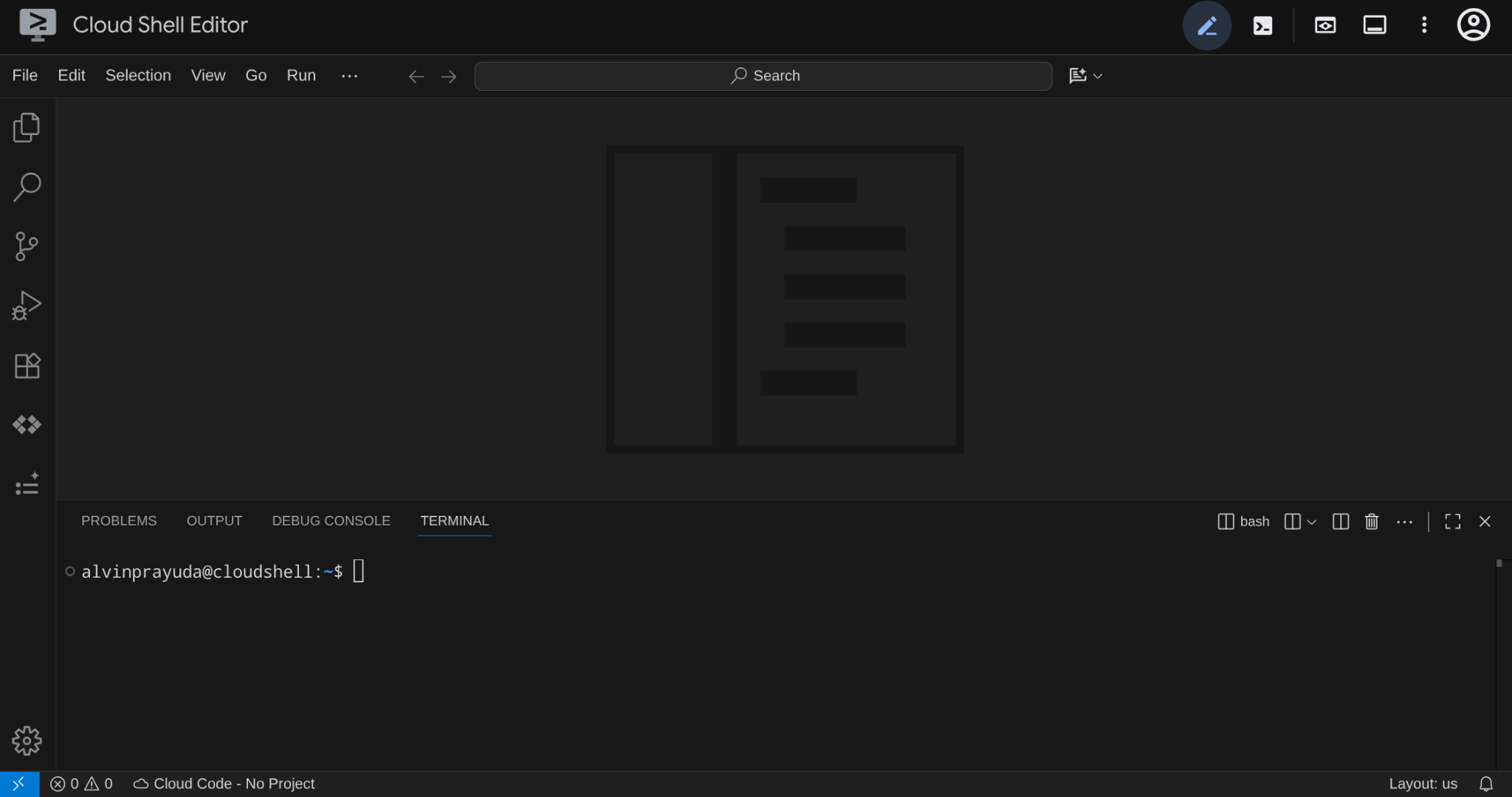
這會是我們的主要介面,頂端是 IDE,底部是終端機
設定目前使用的目錄
複製範例存放區,您在本程式碼研究室中編寫的所有程式碼都會儲存在這裡:
rm -rf ~/adk-a2a-agent-runtime-starter
git clone https://github.com/alphinside/adk-a2a-agent-runtime-starter.git
cloudshell workspace ~/adk-a2a-agent-runtime-starter && cd ~/adk-a2a-agent-runtime-starter
使用提供的範本建立 .env 檔案:
cp .env.example .env
如要簡化終端機中的專案設定,請將這個專案設定指令碼下載至目前使用的目錄:
curl -sL https://raw.githubusercontent.com/alphinside/cloud-trial-project-setup/main/setup_verify_trial_project.sh -o setup_verify_trial_project.sh
執行指令碼,這個指令會驗證試用帳單帳戶、建立新專案 (或驗證現有專案)、將專案 ID 儲存至目前目錄中的 .env 檔案,並在 gcloud 中設定有效專案。
bash setup_verify_trial_project.sh && source .env
指令碼會執行下列動作:
- 確認您有有效的試用帳單帳戶
- 檢查
.env中是否有現有專案 (如有) - 建立新專案或重複使用現有專案
- 將試用帳單帳戶連結至專案
- 將專案 ID 儲存至
.env - 將專案設為有效的
gcloud專案
在 Cloud Shell 終端機提示中,檢查工作目錄旁的黃色文字,確認專案設定正確。應該會顯示專案 ID。

啟用必要 API
接著,我們需要確保已啟用必要 API,才能與 Gemini Enterprise Agent Platform 互動
gcloud services enable \
  aiplatform.googleapis.com \
  cloudresourcemanager.googleapis.com
入門基礎架構設定
首先,我們需要使用 uv 安裝 Python 依附元件。這是一種以 Rust 編寫的快速 Python 套件和專案管理工具 ( uv 文件)。本程式碼研究室使用這項工具,可快速且輕鬆地維護 Python 專案
uv sync
接著執行完整設定指令碼,建立 Cloud SQL 執行個體、植入資料,並部署 Toolbox 服務,做為餐廳代理程式的初始狀態
bash scripts/full_setup.sh > logs/full_setup.log 2>&1 &
4. 概念:Agent2Agent (A2A) 通訊協定和 Gemini Enterprise 代理執行階段
建構之前,請先花點時間瞭解本程式碼研究室中介紹的兩項重要技術,以便擴展代理型應用程式。
Agent2Agent (A2A) 通訊協定
Agent2Agent (A2A) 通訊協定是一項開放標準,旨在讓 AI 代理順暢地通訊及協作。MCP (Model Context Protocol) 可將代理連結至工具和資料,而 A2A 則可將代理連結至其他代理,讓代理探索彼此的能力、委派任務,並跨框架和機構協作。
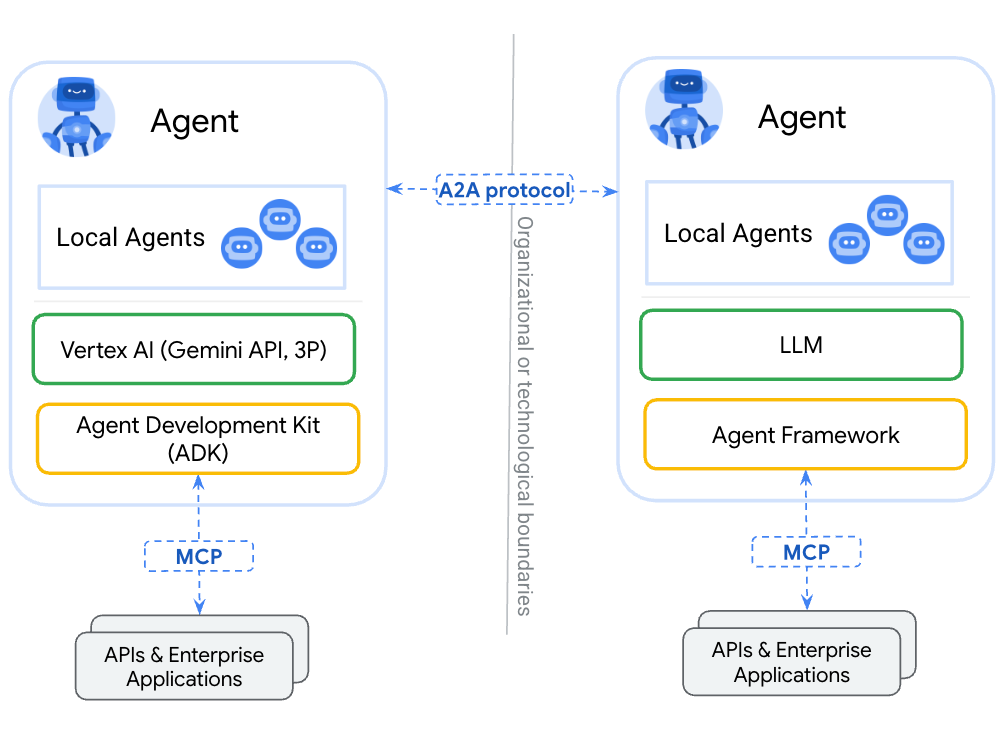
將代理程式包裝為工具 (透過 MCP) 與透過 A2A 公開代理程式的主要差異在於:工具是無狀態的,且執行單一功能,而 A2A 代理程式可以推論、維持狀態,以及處理多輪互動,例如協商或釐清。透過 A2A 公開的代理程式會保留完整功能,而不是縮減為函式呼叫。
A2A 定義了三項核心概念:
- 代理資訊卡:說明代理功能、技能和端點的 JSON 文件。其他代理會擷取這張資訊卡,以探索功能。
- 訊息:傳送至 A2A 端點的使用者或服務專員要求,會觸發工作。
- 工作:具有生命週期的工作單元 (已提交 → 處理中 → 已完成/失敗),以及包含結果的構件。
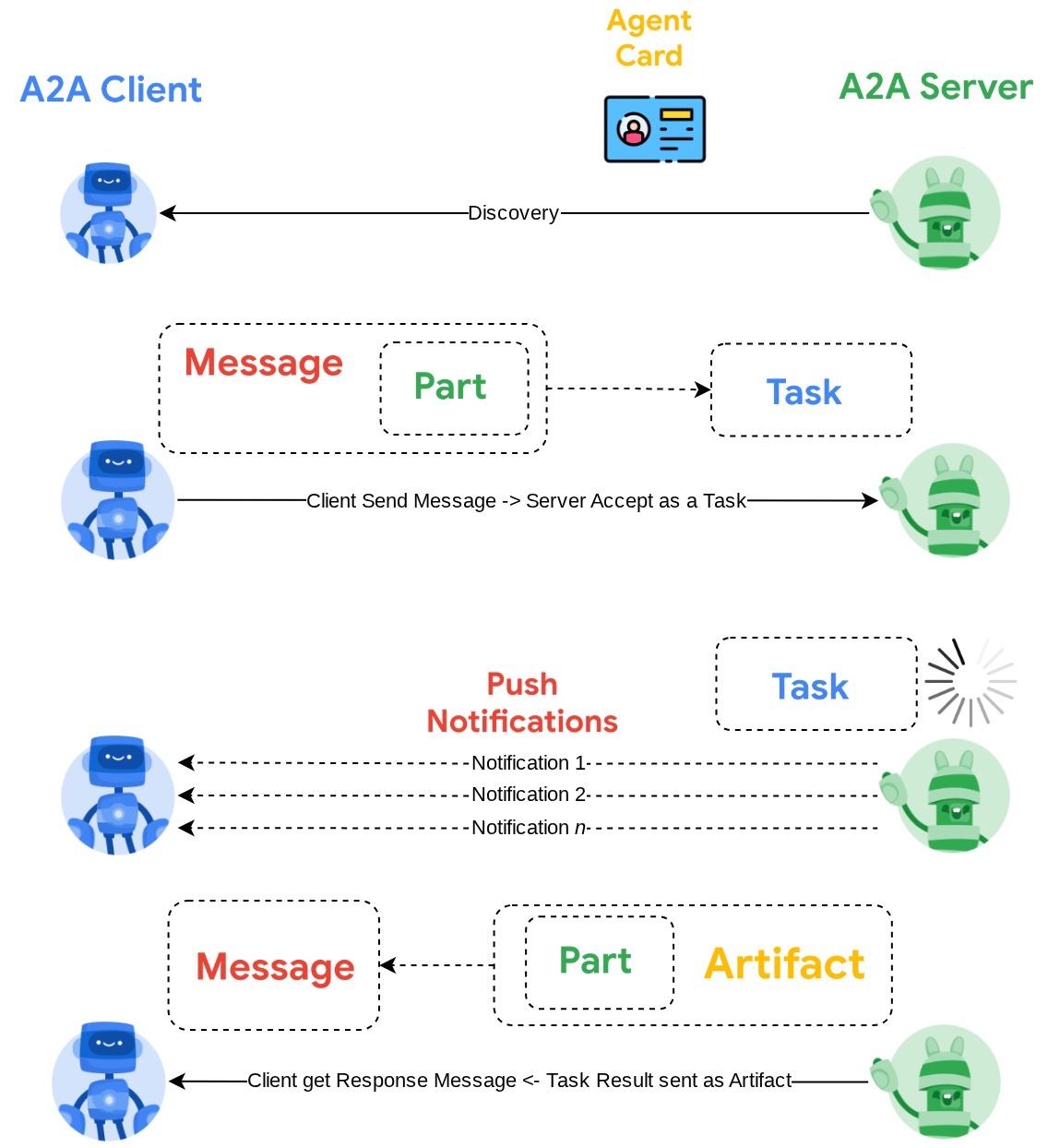
如要深入瞭解,請參閱「什麼是 A2A?」一文。
Gemini Enterprise Agent Platform Runtime
Agent Runtime 是 Google Cloud 的全代管服務,可讓您在正式環境中部署、調度及管理 AI 代理,並提供企業級安全防護功能 (例如 VPC Service Controls、CMEK)。這項服務會處理基礎架構,讓您專心處理代理邏輯。
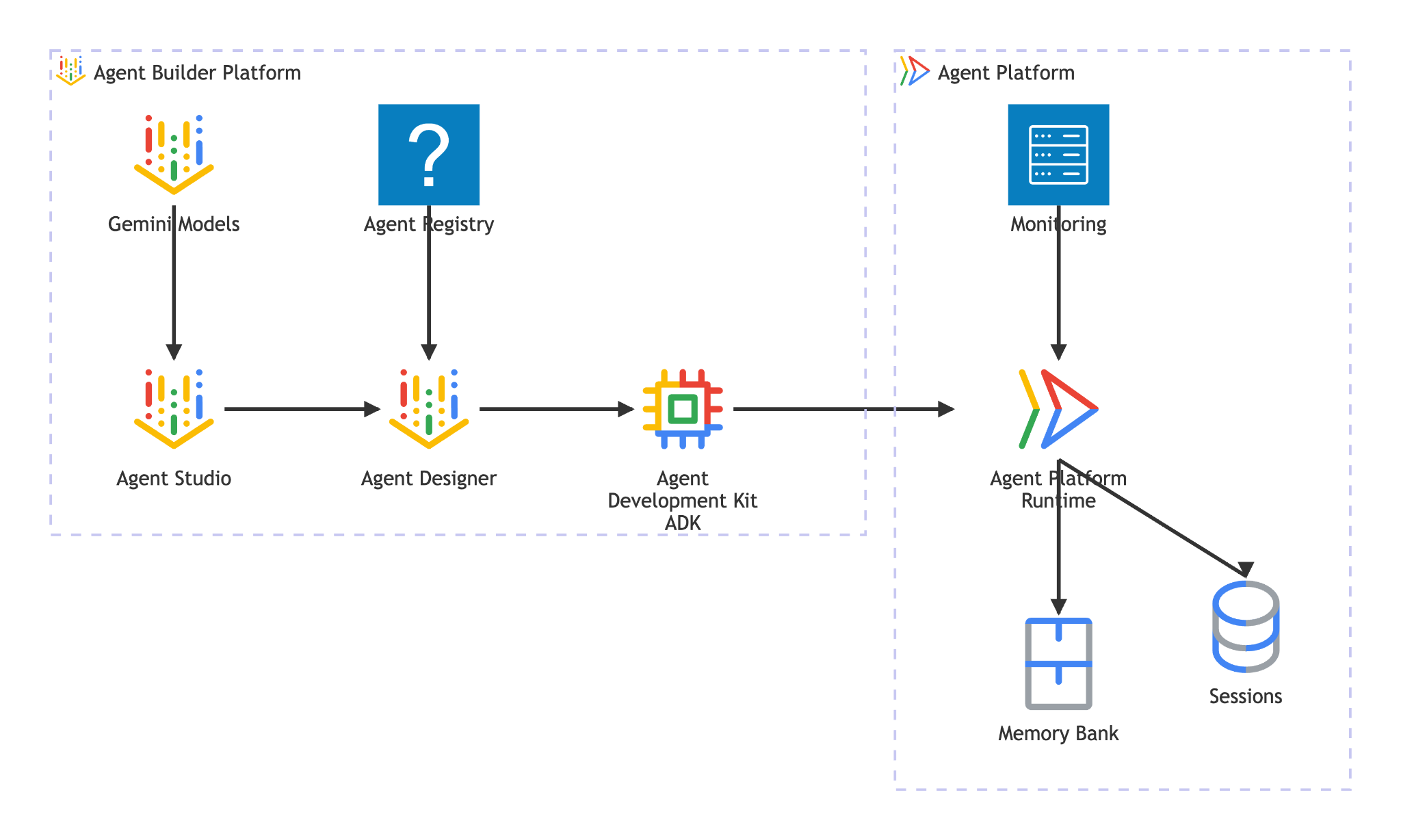
Agent Runtime 提供以下功能:
- 代管部署:透過單一 SDK 呼叫,部署以 ADK、LangGraph 或任何 Python 框架建構的代理程式
- A2A 託管:將代理部署為符合 A2A 規範的端點,並自動提供代理資訊卡和經過驗證的存取權
- 持續性工作階段:
VertexAiSessionService儲存跨要求的對話記錄和狀態 - 自動調度資源:從零開始調度資源來處理流量,不必管理基礎架構
- 觀測能力:透過 Google Cloud 的觀測堆疊,內建追蹤、記錄和監控功能
- 如要瞭解更多功能,請參閱這份說明文件
在本程式碼研究室中,您會將預訂代理部署至 Agent Runtime。部署程序會將代理程式碼序列化 (封存) 並上傳。Agent Runtime 會佈建提供 A2A 通訊協定的無伺服器端點,其他代理 (或用戶端) 可透過標準 HTTP 呼叫與其互動,並使用 Google Cloud 憑證進行驗證。
5. 建構預訂代理程式
這個步驟會建立新的 ADK 代理程式,使用工作階段狀態處理餐廳預訂。這個代理程式支援三項作業 (建立、檢查及取消),並以電話號碼做為查詢鍵。所有預訂資料都位於 ADK 的工作階段狀態
搭建代理程式架構
使用 adk create 產生代理程式目錄結構,並採用正確的模型和專案設定:
source .env
uv run adk create reservation_agent \
    --model gemini-3.5-flash \
    --project ${GOOGLE_CLOUD_PROJECT} \
    --region ${GOOGLE_CLOUD_LOCATION}
這會建立 reservation_agent/ 目錄,其中包含為 Agent Platform 上的 Gemini 模型預先設定的 __init__.py、agent.py 和 .env。
adk-a2a-agent-runtime-starter/
├── reservation_agent/
│   ├── __init__.py
│   ├── agent.py
│   └── .env
├── logs
├── scripts
└── ...
接著,更新代理程式程式碼
編寫代理程式碼
開啟產生的代理程式檔案:
cloudshell edit reservation_agent/agent.py
然後將內容換成下列內容:
# reservation_agent/agent.py
import os
from functools import cached_property
from typing import Any

from google.adk.agents import LlmAgent
from google.adk.models.google_llm import Gemini
from google.adk.tools import ToolContext
from google.genai import Client, types

# App-scoped state prefix ensures reservations persist across all sessions.
# See https://adk.dev/sessions/state/ for state scope details.
STATE_PREFIX = "app:reservation:"


class GeminiGlobal(Gemini):
    """Gemini with location pinned to 'global'.

    A2aAgent.set_up() on Agent Platform Runtime SDK overwrites GOOGLE_CLOUD_LOCATION with the Agent Platform Runtime
    region (e.g. us-central1), but the Gemini 3-family endpoint requires 'global'.
    """

    @cached_property
    def api_client(self) -> Client:
        project = os.getenv("GOOGLE_CLOUD_PROJECT")
        return Client(
            project=project,
            location="global",
            http_options=types.HttpOptions(
                headers=self._tracking_headers(),
                retry_options=self.retry_options,
            ),
        )


def create_reservation(
    phone_number: str,
    name: str,
    party_size: int,
    date: str,
    time: str,
    tool_context: ToolContext,
) -> dict:
    """Create a new restaurant reservation.

    Args:
        phone_number: Customer's phone number, used as the reservation ID.
        name: Name for the reservation.
        party_size: Number of guests.
        date: Reservation date (e.g., '2025-07-15' or 'this Friday').
        time: Reservation time (e.g., '7:00 PM').

    Returns:
        Confirmation of the reservation.
    """
    reservation = {
        "name": name,
        "party_size": party_size,
        "date": date,
        "time": time,
        "status": "confirmed",
    }
    tool_context.state[f"{STATE_PREFIX}{phone_number}"] = reservation
    return {
        "status": "confirmed",
        "message": f"Reservation created for {name}, party of {party_size} on {date} at {time}. Phone: {phone_number}.",
    }


def check_reservation(phone_number: str, tool_context: ToolContext) -> dict:
    """Look up an existing reservation by phone number.

    Args:
        phone_number: The phone number used when the reservation was created.
        tool_context: ADK tool context for state access.

    Returns:
        The reservation details, or a message if not found.
    """
    reservation = tool_context.state.get(f"{STATE_PREFIX}{phone_number}")
    if reservation:
        return {"found": True, "reservation": reservation}
    return {"found": False, "message": f"No reservation found for {phone_number}."}


def cancel_reservation(phone_number: str, tool_context: ToolContext) -> dict:
    """Cancel an existing reservation by phone number.

    Args:
        phone_number: The phone number used when the reservation was created.
        tool_context: ADK tool context for state access.

    Returns:
        Confirmation of cancellation, or a message if not found.
    """
    key = f"{STATE_PREFIX}{phone_number}"
    reservation = tool_context.state.get(key)
    if not reservation:
        return {
            "success": False,
            "message": f"No reservation found for {phone_number}.",
        }
    if reservation.get("status") == "cancelled":
        return {
            "success": False,
            "message": f"Reservation for {phone_number} is already cancelled.",
        }
    reservation["status"] = "cancelled"
    tool_context.state[key] = reservation
    return {
        "success": True,
        "message": f"Reservation for {reservation['name']} ({phone_number}) has been cancelled.",
    }


root_agent = LlmAgent(
    name="reservation_agent",
    model=GeminiGlobal(model="gemini-3.5-flash"),
    instruction="""You are a friendly reservation assistant for "Foodie Finds" restaurant.
You help diners create, check, and cancel table reservations.

When a diner wants to make a reservation, collect these details:
- Name for the reservation
- Phone number (used as the reservation ID)
- Party size (number of guests)
- Date
- Time

Always confirm the details before creating the reservation.
When checking or cancelling, ask for the phone number if not provided.
Be concise and professional.""",
    tools=[create_reservation, check_reservation, cancel_reservation],
)
6. 準備 A2A 伺服器設定
定義 A2A 代理資訊卡
代理資訊卡是代理功能的結構化說明,其他代理和用戶端會使用這張卡片,瞭解代理的功能。建立資訊卡設定:
cloudshell edit reservation_agent/a2a_config.py
將下列內容複製到 reservation_agent/a2a_config.py:
# reservation_agent/a2a_config.py
from a2a.types import AgentSkill
from vertexai.preview.reasoning_engines.templates.a2a import create_agent_card

reservation_skill = AgentSkill(
    id="manage_reservations",
    name="Restaurant Reservations",
    description="Create, check, and cancel table reservations at Foodie Finds restaurant",
    tags=["reservations", "restaurant", "booking"],
    examples=[
        "Book a table for 4 on Friday at 7pm",
        "Check reservation for 555-0101",
        "Cancel my reservation, phone number 555-0101",
    ],
    input_modes=["text/plain"],
    output_modes=["text/plain"],
)

agent_card = create_agent_card(
    agent_name="Reservation Agent",
    description="Handles restaurant table reservations — create, check, and cancel bookings for Foodie Finds restaurant.",
    skills=[reservation_skill],
)
建立 A2A 執行器
執行器會橋接 A2A 通訊協定和 ADK 代理。接收 A2A 要求、透過 ADK 代理執行要求,並以 A2A 工作形式傳回結果:
cloudshell edit reservation_agent/executor.py
將下列內容複製到 reservation_agent/executor.py:
# reservation_agent/executor.py
import os
from typing import NoReturn

import vertexai
from a2a.server.agent_execution import AgentExecutor, RequestContext
from a2a.server.events import EventQueue
from a2a.server.tasks import TaskUpdater
from a2a.types import TaskState, TextPart, UnsupportedOperationError
from a2a.utils import new_agent_text_message
from a2a.utils.errors import ServerError
from google.adk.artifacts import InMemoryArtifactService
from google.adk.memory.in_memory_memory_service import InMemoryMemoryService
from google.adk.runners import Runner
from google.adk.sessions import InMemorySessionService, VertexAiSessionService
from google.genai import types

from reservation_agent.agent import root_agent as reservation_agent


class ReservationAgentExecutor(AgentExecutor):
    """Bridge between the A2A protocol and the ADK reservation agent.

    Uses InMemorySessionService for local testing, VertexAiSessionService
    when deployed to Agent Runtime (detected via GOOGLE_CLOUD_AGENT_ENGINE_ID).
    """

    def __init__(self) -> None:
        self.agent = None
        self.runner = None

    def _init_agent(self) -> None:
        if self.agent is not None:
            return

        self.agent = reservation_agent
        engine_id = os.environ.get("GOOGLE_CLOUD_AGENT_ENGINE_ID")

        if engine_id:
            project = os.environ.get("GOOGLE_CLOUD_PROJECT")
            location = os.environ.get("GOOGLE_CLOUD_LOCATION", "us-central1")
            vertexai.init(project=project, location=location)
            session_service = VertexAiSessionService(
                project=project, location=location, agent_engine_id=engine_id,
            )
            app_name = engine_id
        else:
            session_service = InMemorySessionService()
            app_name = self.agent.name

        self.runner = Runner(
            app_name=app_name,
            agent=self.agent,
            artifact_service=InMemoryArtifactService(),
            session_service=session_service,
            memory_service=InMemoryMemoryService(),
        )

    async def execute(self, context: RequestContext, event_queue: EventQueue) -> None:
        if self.agent is None:
            self._init_agent()

        query = context.get_user_input()
        updater = TaskUpdater(event_queue, context.task_id, context.context_id)
        user_id = context.message.metadata.get("user_id", "a2a-user") if context.message.metadata else "a2a-user"

        if not context.current_task:
            await updater.submit()
        await updater.start_work()

        try:
            session = await self._get_or_create_session(context.context_id, user_id)
            content = types.Content(role="user", parts=[types.Part(text=query)])

            async for event in self.runner.run_async(
                session_id=session.id, user_id=user_id, new_message=content,
            ):
                if event.is_final_response():
                    parts = event.content.parts
                    answer = " ".join(p.text for p in parts if p.text) or "No response."
                    await updater.add_artifact([TextPart(text=answer)], name="answer")
                    await updater.complete()
                    break
        except Exception as e:
            await updater.update_status(
                TaskState.failed, message=new_agent_text_message(f"Error: {e!s}"),
            )
            raise

    async def _get_or_create_session(self, context_id: str, user_id: str):
        app_name = self.runner.app_name
        if context_id:
            session = await self.runner.session_service.get_session(
                app_name=app_name, session_id=context_id, user_id=user_id,
            )
            if session:
                return session
        session = await self.runner.session_service.create_session(
            app_name=app_name, user_id=user_id, session_id=context_id,
        )
        return session

    async def cancel(self, context: RequestContext, event_queue: EventQueue) -> NoReturn:
        raise ServerError(error=UnsupportedOperationError())
執行器會自動偵測環境:設定 GOOGLE_CLOUD_AGENT_ENGINE_ID 時 (Agent Runtime 會在部署時注入此項目),執行器會使用 VertexAiSessionService 持續保留工作階段。在當地,系統會改為採用 InMemorySessionService。
您的 reservation_agent 目錄現在應包含:
reservation_agent/
├── __init__.py
├── agent.py
├── a2a_config.py
├── executor.py
└── .env
7. 使用 Agent Platform SDK 準備 A2A 代理,並在本機進行測試
這個步驟會使用 Agent Platform SDK ( 為確保回溯相容性,SDK 名稱仍使用 vertex 字詞) 的 A2aAgent 類別,將預訂代理封裝為符合 A2A 規範的代理,然後在本機測試完整的 A2A 通訊協定流程,包括擷取代理資訊卡、傳送訊息及擷取工作。這與您在下一個步驟中部署至 Agent Runtime 的 A2aAgent 物件相同。
新增依附元件
安裝 Agent Platform SDK,並支援 Agent 執行階段和 ADK,以及 A2A SDK:
uv add "google-cloud-aiplatform[agent_engines,adk]==1.149.0" "a2a-sdk==0.3.26"
瞭解 A2A 元件
如要為 A2A 包裝 ADK 代理,需要三個元件:
- 代理資訊卡:描述代理功能、技能和端點網址的「商家名片」。其他代理會根據這項資訊,瞭解您的代理功能。
- 代理執行器:A2A 通訊協定與 ADK 代理邏輯之間的橋樑。這項服務會接收 A2A 要求、透過 ADK 代理執行要求,並以 A2A 工作形式傳回結果。
- A2aAgent:Agent Platform SDK 類別,可將資訊卡和執行器合併為可部署的單元。
建立測試腳本
建立下列指令碼,在本機進行測試
cloudshell edit scripts/test_a2a_agent_local.py
將下列內容複製到 scripts/test_a2a_agent_local.py:
# scripts/test_a2a_agent_local.py
import asyncio
import json
import os
from pprint import pprint

from dotenv import load_dotenv
from starlette.requests import Request
from vertexai.preview.reasoning_engines import A2aAgent

from reservation_agent.a2a_config import agent_card
from reservation_agent.executor import ReservationAgentExecutor

load_dotenv()


# --- Helper functions for building mock requests ---

def receive_wrapper(data: dict):
    async def receive():
        byte_data = json.dumps(data).encode("utf-8")
        return {"type": "http.request", "body": byte_data, "more_body": False}
    return receive

def build_post_request(data: dict = None, path_params: dict = None) -> Request:
    scope = {"type": "http", "http_version": "1.1", "headers": [(b"content-type", b"application/json")], "app": None}
    if path_params:
        scope["path_params"] = path_params
    return Request(scope, receive_wrapper(data))

def build_get_request(path_params: dict) -> Request:
    scope = {"type": "http", "http_version": "1.1", "query_string": b"", "app": None}
    if path_params:
        scope["path_params"] = path_params
    async def receive():
        return {"type": "http.disconnect"}
    return Request(scope, receive)


# --- Helper: poll for task completion ---

async def wait_for_task(a2a_agent, task_id, max_retries=30):
    """Poll on_get_task until the task reaches a terminal state."""
    for _ in range(max_retries):
        request = build_get_request({"id": task_id})
        result = await a2a_agent.on_get_task(request=request, context=None)
        state = result.get("status", {}).get("state", "")
        if state in ["completed", "failed"]:
            return result
        await asyncio.sleep(1)
    return result


def print_task_answer(result):
    """Extract and print the answer from task artifacts."""
    print(f"Status: {result.get('status', {}).get('state')}")
    for artifact in result.get("artifacts", []):
        if artifact.get("parts") and "text" in artifact["parts"][0]:
            print(f"Answer: {artifact['parts'][0]['text']}")


# --- Local test ---

async def main():
    # Create and set up the A2A agent locally

    a2a_agent = A2aAgent(agent_card=agent_card, agent_executor_builder=ReservationAgentExecutor)
    a2a_agent.set_up()

    # 1. Get agent card
    print("=" * 50)
    print("1. Retrieving agent card...")
    print("=" * 50)
    request = build_get_request(None)
    card_response = await a2a_agent.handle_authenticated_agent_card(request=request, context=None)
    print(f"Agent: {card_response.get('name')}")
    print(f"Skills: {[s.get('name') for s in card_response.get('skills', [])]}")

    # 2. Create a reservation
    print("\n" + "=" * 50)
    print("2. Creating a reservation...")
    print("=" * 50)
    message_data = {
        "message": {
            "messageId": f"msg-{os.urandom(4).hex()}",
            "content": [{"text": "Book a table for 2 on Saturday at 6pm. Name: Bob, Phone: 555-0202"}],
            "role": "ROLE_USER",
        },
    }
    request = build_post_request(message_data)
    response = await a2a_agent.on_message_send(request=request, context=None)
    task_id = response["task"]["id"]
    context_id = response["task"].get("contextId")
    print(f"Task ID: {task_id}")

    # 3. Wait for result
    print("\n" + "=" * 50)
    print("3. Waiting for task result...")
    print("=" * 50)
    result = await wait_for_task(a2a_agent, task_id)
    print_task_answer(result)

    # 4. Check the reservation (same context for session continuity)
    print("\n" + "=" * 50)
    print("4. Checking the reservation...")
    print("=" * 50)
    check_data = {
        "message": {
            "messageId": f"msg-{os.urandom(4).hex()}",
            "content": [{"text": "Check the reservation for 555-0202"}],
            "role": "ROLE_USER",
            "contextId": context_id,
        },
    }
    request = build_post_request(check_data)
    check_response = await a2a_agent.on_message_send(request=request, context=None)
    check_result = await wait_for_task(a2a_agent, check_response["task"]["id"])
    print_task_answer(check_result)

    # 5. Cancel the reservation
    print("\n" + "=" * 50)
    print("5. Cancelling the reservation...")
    print("=" * 50)
    cancel_data = {
        "message": {
            "messageId": f"msg-{os.urandom(4).hex()}",
            "content": [{"text": "Cancel the reservation for 555-0202"}],
            "role": "ROLE_USER",
            "contextId": context_id,
        },
    }
    request = build_post_request(cancel_data)
    cancel_response = await a2a_agent.on_message_send(request=request, context=None)
    cancel_result = await wait_for_task(a2a_agent, cancel_response["task"]["id"])
    print_task_answer(cancel_result)

    print("\n" + "=" * 50)
    print("All tests passed!")
    print("=" * 50)


if __name__ == "__main__":
    asyncio.run(main())
測試指令碼會匯入您在上一個步驟中建立的代理程式卡片和執行器,不會重複匯入。這會建立本機 A2aAgent、透過模擬 HTTP 要求模擬 A2A 通訊協定呼叫,並驗證所有三項預訂作業。
由於本機未設定 GOOGLE_CLOUD_AGENT_ENGINE_ID,執行器會使用 InMemorySessionService。部署至 Agent Runtime 時,相同的執行器會自動切換至 VertexAiSessionService,以保留工作階段。
執行測試
PYTHONPATH=. uv run python scripts/test_a2a_agent_local.py
輸出內容會逐步說明五個階段:
- 代理資訊卡:擷取代理的能力和技能
- 建立預訂:預訂座位並傳回含有確認資訊的工作
- 取得工作結果:擷取已完成的工作和答案
- 查看預約記錄:依電話號碼查詢預約記錄
- 「取消預訂」:取消預訂並確認
輸出範例如下所示
==================================================
1. Retrieving agent card...
==================================================
Agent: Reservation Agent
Skills: ['Restaurant Reservations']

==================================================
2. Creating a reservation...
==================================================
Task ID: f7f7004d-cfea-49c2-b57d-5bca9959e193

==================================================
3. Waiting for task result...
==================================================
Status: TASK_STATE_COMPLETED
Answer: Your reservation for Bob, party of 2, on Saturday at 6:00 PM has been confirmed. The phone number associated is 555-0202.

==================================================
4. Checking the reservation...
==================================================
Status: TASK_STATE_COMPLETED
Answer: I found a reservation for Bob, party of 2, on Saturday at 6:00 PM. The reservation status is confirmed.

==================================================
5. Cancelling the reservation...
==================================================
Status: TASK_STATE_COMPLETED
Answer: Your reservation for Bob (555-0202) has been cancelled.

==================================================
All tests passed!
==================================================
此時您已驗證:A2A 代理程式資訊卡說明瞭正確的技能;所有三項預訂作業都透過 A2A 通訊協定的訊息/工作流程運作;狀態會在同一脈絡中的訊息之間保留。
8. 將預訂代理部署至 Agent Runtime
這個步驟會將預訂代理程式部署至 Gemini Enterprise Agent Platform Runtime,這是全代管的無伺服器平台,可代管代理程式並將其公開為安全的 A2A 端點。部署完成後,任何授權用戶端都可以透過標準 A2A HTTP 端點探索代理並與之互動。
建立暫存 bucket
建立 Agent Runtime 暫存用的 Cloud Storage bucket。Agent Runtime 會在部署期間使用這個 bucket 上傳代理的程式碼和依附元件:
STAGING_BUCKET="${GOOGLE_CLOUD_PROJECT}-adk-a2a-agent-runtime"
gsutil mb -l $REGION -p $GOOGLE_CLOUD_PROJECT gs://$STAGING_BUCKET 2>/dev/null || echo "Bucket already exists"
echo "STAGING_BUCKET=$STAGING_BUCKET" >> .env
source .env
建立部署指令碼
接著,我們需要準備部署指令碼
cloudshell edit scripts/deploy_a2a_agent_runtime.py
將下列內容複製到 scripts/deploy_a2a_agent_runtime.py:
# scripts/deploy_a2a_agent_runtime.py
import os
from pathlib import Path

import vertexai
from dotenv import load_dotenv
from google.genai import types
from vertexai.preview.reasoning_engines import A2aAgent

from reservation_agent.a2a_config import agent_card
from reservation_agent.executor import ReservationAgentExecutor

load_dotenv()

PROJECT_ID = os.environ["GOOGLE_CLOUD_PROJECT"]
REGION = os.environ["REGION"]
STAGING_BUCKET = os.environ.get("STAGING_BUCKET", f"{PROJECT_ID}-adk-a2a-agent-runtime")
BUCKET_URI = f"gs://{STAGING_BUCKET}"

a2a_agent = A2aAgent(
    agent_card=agent_card,
    agent_executor_builder=ReservationAgentExecutor,
)


def main():
    vertexai.init(project=PROJECT_ID, location=REGION, staging_bucket=BUCKET_URI)
    client = vertexai.Client(
        project=PROJECT_ID,
        location=REGION,
        http_options=types.HttpOptions(api_version="v1beta1"),
    )

    print("Deploying Reservation Agent to Agent Runtime...")
    print("This may take 3-5 minutes.")

    remote_agent = client.agent_engines.create(
        agent=a2a_agent,
        config={
            "display_name": agent_card.name,
            "description": agent_card.description,
            "requirements": [
                "google-cloud-aiplatform[agent_engines,adk]==1.149.0",
                "a2a-sdk==0.3.26",
                "google-adk==1.29.0",
                "cloudpickle",
                "pydantic"
            ],
            "extra_packages": [
                "./reservation_agent",
            ],
            "http_options": {
                "api_version": "v1beta1",
            },
            "staging_bucket": BUCKET_URI,
        },
    )

    resource_name = remote_agent.api_resource.name
    print(f"\nDeployment complete!")
    print(f"Resource name: {resource_name}")

    env_path = Path(".env")
    lines = env_path.read_text().splitlines() if env_path.exists() else []
    lines = [l for l in lines if not l.startswith("RESERVATION_AGENT_RESOURCE_NAME=")]
    lines.append(f"RESERVATION_AGENT_RESOURCE_NAME={resource_name}")
    env_path.write_text("\n".join(lines) + "\n")
    print("Written RESERVATION_AGENT_RESOURCE_NAME to .env")


if __name__ == "__main__":
    main()
部署指令碼會匯入本機測試中使用的相同 agent_card 和 ReservationAgentExecutor,因此不會有重複的程式碼。Agent Runtime 會序列化 (封存) A2aAgent 物件及其依附元件,以供部署。部署指令碼會在結尾將 RESERVATION_AGENT_RESOURCE_NAME 值寫入 .env 檔案
部署至 Agent Runtime
執行部署指令碼:
PYTHONPATH=. uv run python scripts/deploy_a2a_agent_runtime.py
部署作業需要 3 至 5 分鐘。指令碼會在 Agent Runtime 上佈建無伺服器端點,用於代管預訂代理程式。部署成功後,畫面會顯示類似下方的輸出內容
Deploying Reservation Agent to Agent Runtime...
This may take 3-5 minutes.

Deployment complete!
Resource name: projects/your-project-number/locations/us-central1/reasoningEngines/your-agent-deployment-unique-id
Written RESERVATION_AGENT_RESOURCE_NAME to .env
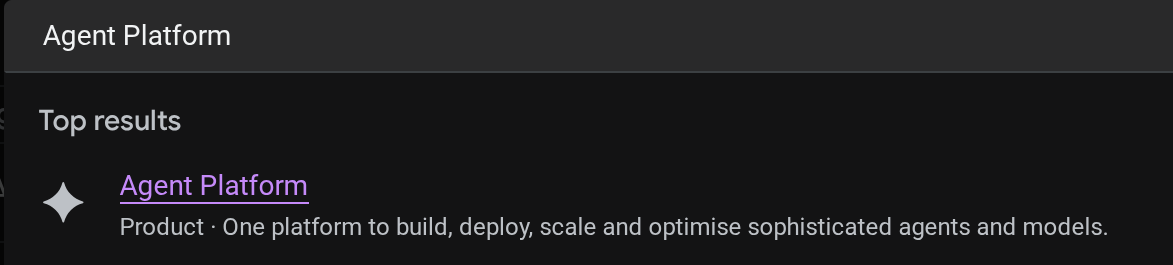
您可以在 Cloud 控制台中查看已部署的代理程式。在控制台搜尋列中搜尋 Agent Platform
然後在左側分頁標籤上將游標懸停在 Agents 上,並選取 Deployments
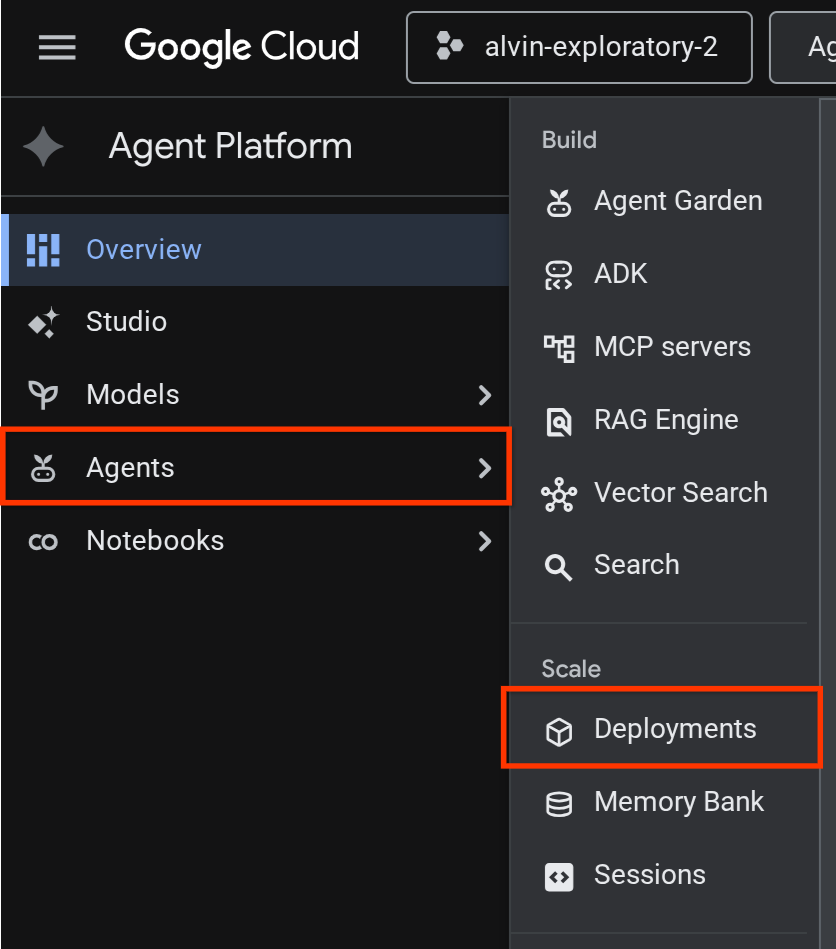
部署作業清單會列出 Reservation Agent,如下所示

測試已部署的代理
現在,我們已準備好測試已部署的代理程式,請為已部署的代理程式建立測試腳本:
cloudshell edit scripts/test_a2a_agent_runtime.py
將下列內容複製到 scripts/test_a2a_agent_runtime.py:
# scripts/test_a2a_agent_runtime.py
import asyncio
import os
import time

import vertexai
from a2a.types import TaskState
from dotenv import load_dotenv
from google.genai import types

load_dotenv()

PROJECT_ID = os.environ["GOOGLE_CLOUD_PROJECT"]
REGION = os.environ["REGION"]
RESOURCE_NAME = os.environ["RESERVATION_AGENT_RESOURCE_NAME"]


async def main():
    vertexai.init(project=PROJECT_ID, location=REGION)
    client = vertexai.Client(
        project=PROJECT_ID, location=REGION,
        http_options=types.HttpOptions(api_version="v1beta1"),
    )

    agent = client.agent_engines.get(name=RESOURCE_NAME)

    # 1. Get agent card
    print("=" * 50)
    print("1. Retrieving agent card...")
    print("=" * 50)
    card = await agent.handle_authenticated_agent_card()
    print(f"Agent: {card.name}")
    print(f"URL: {card.url}")
    print(f"Skills: {[s.name for s in card.skills]}")

    # 2. Send a reservation request
    print("\n" + "=" * 50)
    print("2. Sending reservation request...")
    print("=" * 50)
    message_data = {
        "messageId": "msg-remote-001",
        "role": "user",
        "parts": [{"kind": "text", "text": "Book a table for 3 on Sunday at noon. Name: Carol, Phone: 555-0303"}],
    }
    response = await agent.on_message_send(**message_data)

    task_object = None
    for chunk in response:
        if isinstance(chunk, tuple) and len(chunk) > 0 and hasattr(chunk[0], "id"):
            task_object = chunk[0]
            break

    task_id = task_object.id
    print(f"Task ID: {task_id}")
    print(f"Status: {task_object.status.state}")

    # 3. Poll for result
    print("\n" + "=" * 50)
    print("3. Waiting for result...")
    print("=" * 50)
    result = None
    for _ in range(30):
        try:
            result = await agent.on_get_task(id=task_id)
            if result.status.state in [TaskState.completed, TaskState.failed]:
                break
        except Exception:
            pass
        time.sleep(1)

    print(f"Final status: {result.status.state}")
    if result.artifacts:
        for artifact in result.artifacts:
            if artifact.parts and hasattr(artifact.parts[0], "root") and hasattr(artifact.parts[0].root, "text"):
                print(f"Answer: {artifact.parts[0].root.text}")

    print("\n" + "=" * 50)
    print("Remote agent test passed!")
    print("=" * 50)


if __name__ == "__main__":
    asyncio.run(main())
接著執行測試
source .env
uv run python scripts/test_a2a_agent_runtime.py
輸出內容會顯示具有「餐廳訂位」技能的代理程式資訊卡,接著會完成工作並顯示訂位確認訊息。
==================================================
1. Retrieving agent card...
==================================================
Agent: Reservation Agent
URL: https://us-central1-aiplatform.googleapis.com/v1beta1/projects/your-project-id/locations/us-central1/reasoningEngines/your-agent-unique-id/a2a
Skills: ['Restaurant Reservations']

==================================================
2. Sending reservation request...
==================================================
Task ID: b34585d0-5f03-4cb0-85a3-40710a0d224d
Status: TaskState.completed

==================================================
3. Waiting for result...
==================================================
Final status: TaskState.completed
Answer: Your reservation for Carol, party of 3 on Sunday at noon with phone number 555-0303 is confirmed.

==================================================
Remote agent test passed!
==================================================
預訂代理現在已在 Agent Runtime 上順利執行,做為代管的 A2A 端點。
9. 將 A2A 預訂代理與根餐廳代理整合
這個步驟會升級餐廳代理,將已部署的預訂代理做為遠端 A2A 子代理。協調器會在本地執行,預訂代理則會在 Agent Runtime 上執行,這是部分整合,可在全面部署前驗證 A2A 連線。
解決 A2A 代理資訊卡網址
RemoteA2aAgent 需要已部署預訂代理的資訊卡網址,才能探索其功能。建立指令碼,從 Agent Runtime 擷取這個網址,並將其寫入餐廳代理程式的 .env:
cloudshell edit scripts/resolve_agent_card_url.py
將下列內容複製到 scripts/resolve_agent_card_url.py:
# scripts/resolve_agent_card_url.py
import asyncio
import os
from pathlib import Path

import vertexai
from dotenv import load_dotenv
from google.genai import types

load_dotenv()

PROJECT_ID = os.environ["GOOGLE_CLOUD_PROJECT"]
REGION = os.environ["REGION"]
RESOURCE_NAME = os.environ["RESERVATION_AGENT_RESOURCE_NAME"]


async def main():
    vertexai.init(project=PROJECT_ID, location=REGION)
    client = vertexai.Client(
        project=PROJECT_ID, location=REGION,
        http_options=types.HttpOptions(api_version="v1beta1"),
    )

    agent = client.agent_engines.get(name=RESOURCE_NAME)
    card = await agent.handle_authenticated_agent_card()
    card_url = f"{card.url}/v1/card"

    print(f"Agent: {card.name}")
    print(f"Card URL: {card_url}")

    # Write to restaurant_agent/.env
    # Write to both restaurant_agent/.env (for adk web) and root .env (for Cloud Run deploy)
    for env_path in [Path("restaurant_agent/.env"), Path(".env")]:
        lines = env_path.read_text().splitlines() if env_path.exists() else []
        lines = [l for l in lines if not l.startswith("RESERVATION_AGENT_CARD_URL=")]
        lines.append(f"RESERVATION_AGENT_CARD_URL={card_url}")
        env_path.write_text("\n".join(lines) + "\n")
        print(f"Written RESERVATION_AGENT_CARD_URL to {env_path}")


if __name__ == "__main__":
    asyncio.run(main())
執行指令碼,在 .env 檔案中填入代理商資訊卡網址
uv run python scripts/resolve_agent_card_url.py
source .env
更新餐廳代理程式
開啟餐廳代理程式檔案:
cloudshell edit restaurant_agent/agent.py
接著,將內容換成更新後的版本,其中包含遠端預訂代理程式做為子代理程式:
# restaurant_agent/agent.py
import os

import httpx
from google.adk.agents import LlmAgent
from google.adk.agents.remote_a2a_agent import RemoteA2aAgent
from google.auth import default
from google.auth.transport.requests import Request as AuthRequest
from toolbox_adk import ToolboxToolset

TOOLBOX_URL = os.environ.get("TOOLBOX_URL", "http://127.0.0.1:5000")
RESERVATION_AGENT_CARD_URL = os.environ.get("RESERVATION_AGENT_CARD_URL", "")

toolbox = ToolboxToolset(TOOLBOX_URL)


class GoogleCloudAuth(httpx.Auth):
    """Auto-refreshing Google Cloud authentication for httpx.

    Refreshes the access token before each request if expired,
    so long-running agents never hit 401 errors.
    """

    def __init__(self):
        self.credentials, _ = default(
            scopes=["https://www.googleapis.com/auth/cloud-platform"]
        )

    def auth_flow(self, request):
        # Refresh the token if it is expired or missing
        if not self.credentials.valid:
            self.credentials.refresh(AuthRequest())

        request.headers["Authorization"] = f"Bearer {self.credentials.token}"
        yield request


reservation_remote_agent = RemoteA2aAgent(
    name="reservation_agent",
    description="Handles restaurant table reservations — create, check, and cancel bookings. Delegate to this agent when the user wants to book a table, check a reservation, or cancel a reservation.",
    agent_card=RESERVATION_AGENT_CARD_URL,
    httpx_client=httpx.AsyncClient(auth=GoogleCloudAuth(), timeout=60),
)

root_agent = LlmAgent(
    name="restaurant_agent",
    model="gemini-3.5-flash",
    instruction="""You are a friendly and knowledgeable concierge at "Foodie Finds," a restaurant. Your job:
- Help diners browse the menu by category or cuisine type.
- Provide full details about specific dishes, including ingredients, price, and dietary information.
- Recommend dishes based on natural language descriptions of what the diner is craving.
- Add new menu items when asked.
- For reservation requests (booking, checking, or cancelling tables), delegate to the reservation_agent.

When a diner asks about a specific dish by name or cuisine, use the get-item-details tool.
When a diner asks for a specific category or cuisine type, use the search-menu tool.
When a diner describes what kind of food they want — by flavor, texture, dietary needs, or cravings — use the search-menu-by-description tool for semantic search.

When in doubt between search-menu and search-menu-by-description, prefer search-menu-by-description — it searches dish descriptions and finds more relevant matches.
If a dish is not available (available is false), let the diner know and suggest similar alternatives from the search results.
Be conversational, knowledgeable, and concise.""",
    tools=[toolbox],
    sub_agents=[reservation_remote_agent],
)
與前一版相比,主要異動如下:
GoogleCloudAuth:自訂httpx.Auth處理常式,會在每次要求前重新整理 Google Cloud 存取權杖。Agent Runtime 需要經過驗證的 A2A 呼叫,且權杖會在一段時間後失效。RemoteA2aAgent從.env讀取RESERVATION_AGENT_CARD_URL(由解析指令碼編寫),並使用經過驗證的httpx_client- 註冊為子代理:ADK 的自動調度管理工具會自動將預訂要求委派給子代理
- 更新操作說明,提及預訂委派功能
在本機測試整合式代理
範例代理程式需要與 MCP Toolbox 整合,所需檔案應已在上一個程式碼研究室或範例存放區中提供。我們只需要確保工具箱程序正常運作即可。
如果 .env 中的 TOOLBOX_URL 已指向 Cloud Run 服務 (來自先前的程式碼研究室,或可能來自入門存放區的 full_setup.sh),您可以略過這個步驟,因為代理程式會連線至已部署的工具箱。
如需使用本機工具箱,請先檢查是否已有執行個體正在執行,再啟動新執行個體:
if curl -s http://127.0.0.1:5000/api/toolsets > /dev/null 2>&1; then
  echo "Toolbox already running on port 5000"
else
  set -a; source .env; set +a
  ./toolbox --config=tools.yaml > logs/toolbox.log 2>&1 &
  echo "Toolbox started"
fi
接著,我們可以嘗試透過 ADK 網頁開發 UI 與餐廳代理互動
uv run adk web --allow_origins "regex:https://.*\.cloudshell\.dev" --port 8080
使用 Cloud Shell 網頁預覽功能開啟 ADK 網頁 UI (按一下「網頁預覽」按鈕,將通訊埠變更為 8080),然後選取 restaurant_agent
測試混合對話:
選單查詢
What Italian dishes do you have?
預訂要求
I want to create reservation under name Bob, phone number 123456
查看預訂
建立新工作階段 ( 開始全新對話):
Check the reservation for 123456
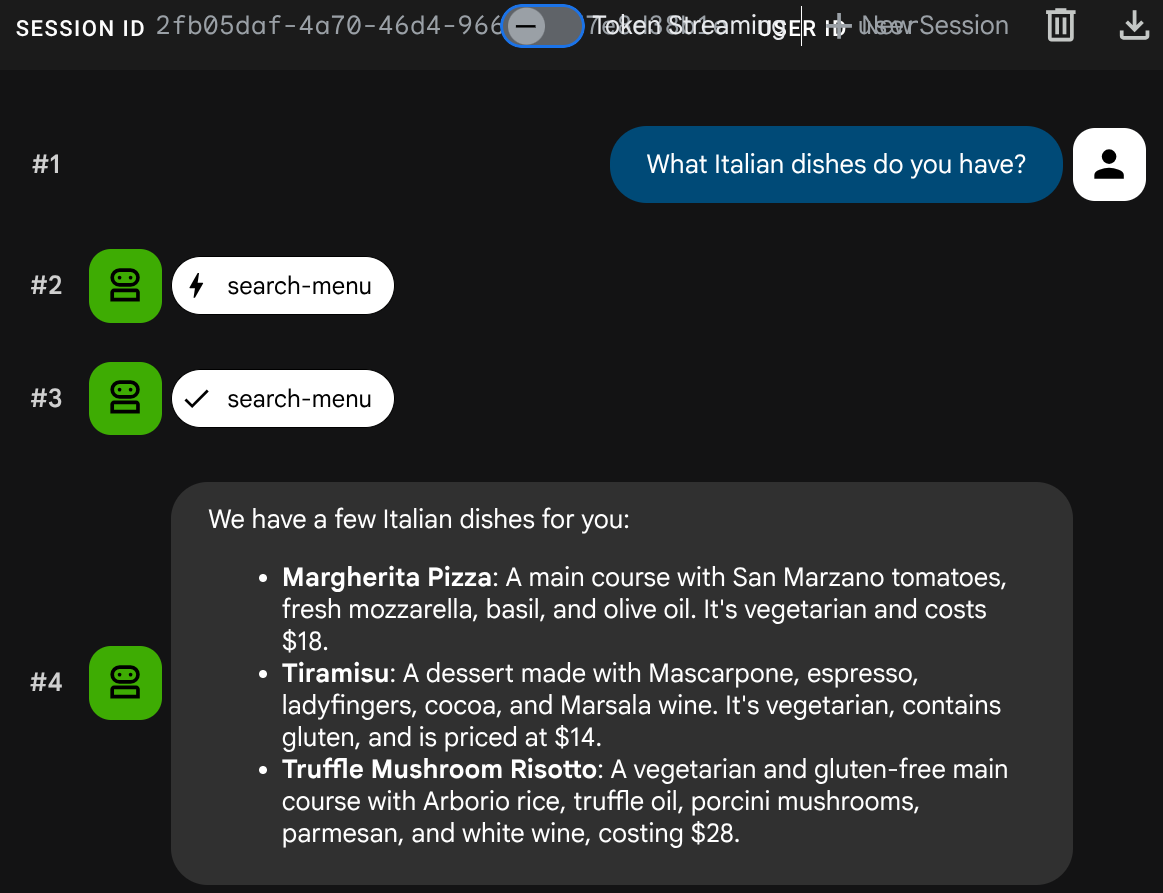
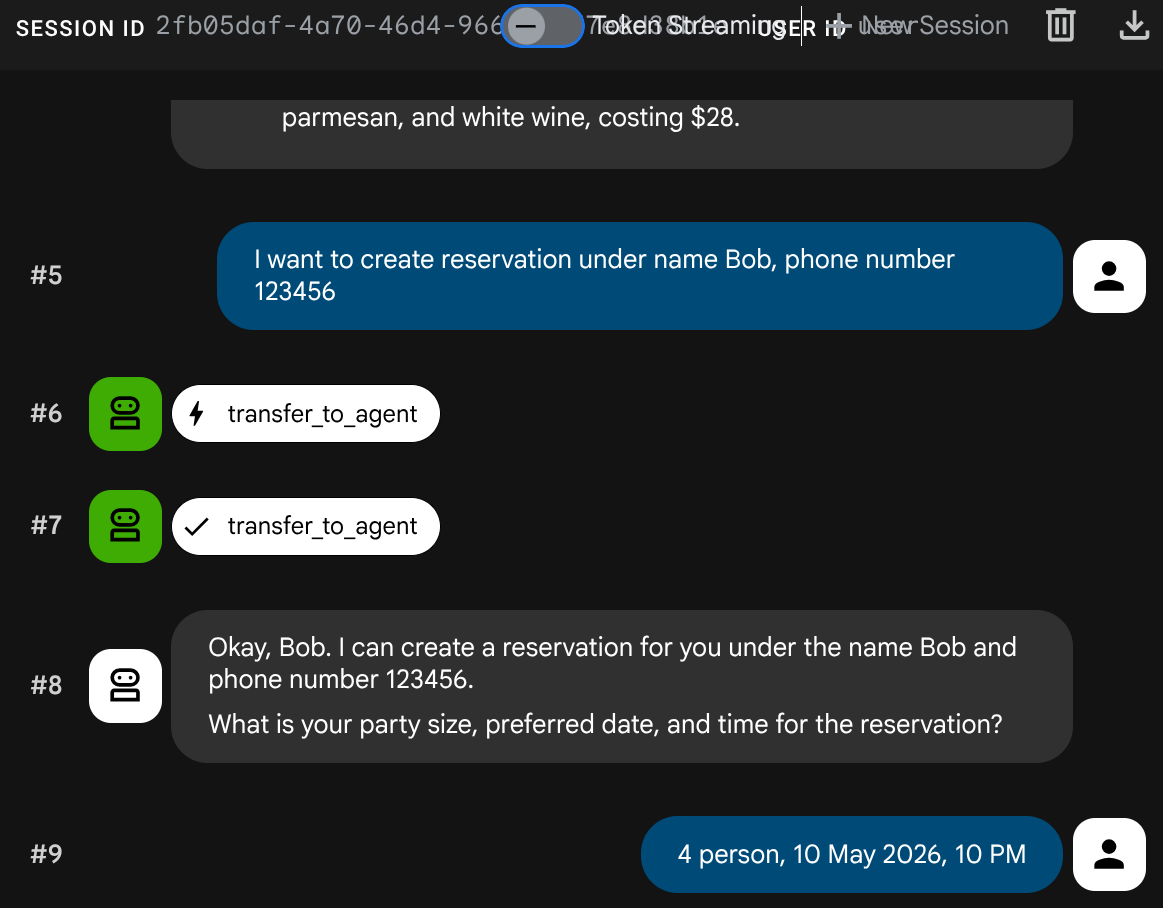
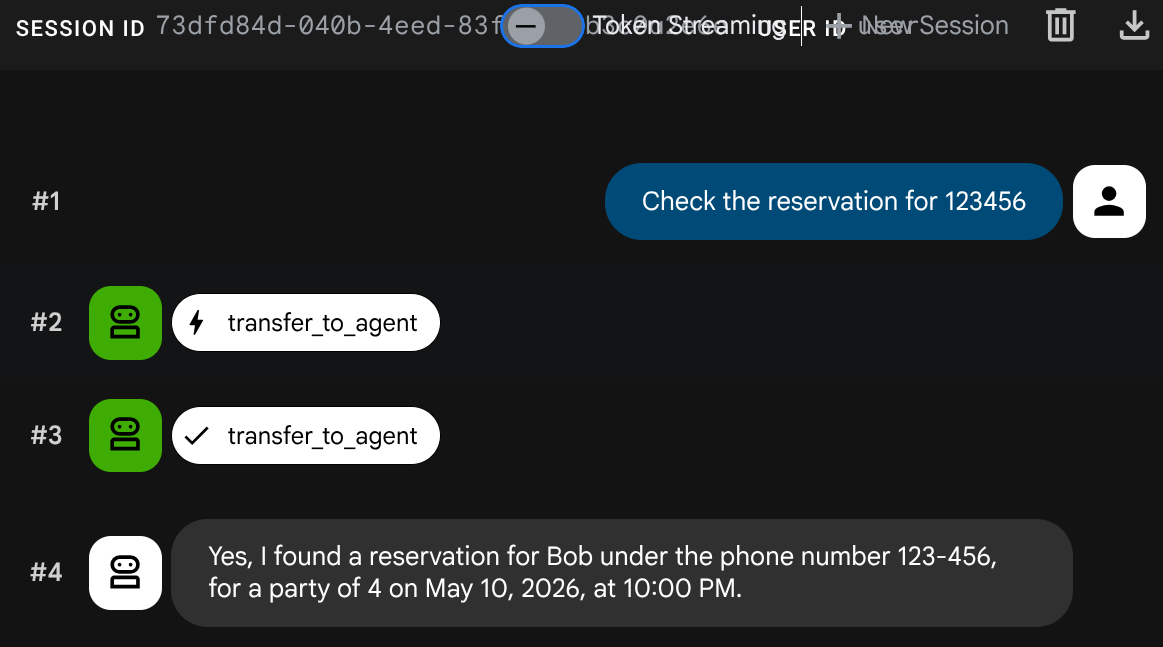
按兩次 Ctrl+C 鍵,停止 adk web 程序。接著,請完整部署代理程式,完成系統設定
10. 將更新後的餐廳代理程式部署至 Cloud Run
這個步驟會將餐廳代理程式重新部署至 Cloud Run,並整合 A2A,完成多代理系統的完整部署作業。
授予存取 Agent Runtime 的權限
Cloud Run 服務帳戶必須具備呼叫 Agent Runtime 的權限。將 roles/aiplatform.user 角色授予預設的 Compute Engine 服務帳戶:
PROJECT_NUMBER=$(gcloud projects describe $GOOGLE_CLOUD_PROJECT --format='value(projectNumber)')
gcloud projects add-iam-policy-binding $GOOGLE_CLOUD_PROJECT \
  --member="serviceAccount:${PROJECT_NUMBER}-compute@developer.gserviceaccount.com" \
  --role="roles/aiplatform.user"
部署至 Cloud Run
在本設定中,我們假設餐廳代理服務已存在於先前的程式碼研究室中,或是透過執行 scripts/full_setup.sh (如果您是從頭開始)。這會使用更新後的程式碼 (新的 RemoteA2aAgent 整合) 重新部署,並將預訂代理程式資訊卡網址新增為新的環境變數,現有的環境變數 (TOOLBOX_URL、GOOGLE_CLOUD_PROJECT 等) 則會保留:
gcloud run deploy restaurant-agent \
  --source . \
  --region=$REGION \
  --allow-unauthenticated \
  --update-env-vars="RESERVATION_AGENT_CARD_URL=$RESERVATION_AGENT_CARD_URL" \
  --min-instances=0 \
  --max-instances=1 \
  --memory=1Gi \
  --port=8080
測試完整部署的系統
取得已部署的服務網址:
AGENT_URL=$(gcloud run services describe restaurant-agent --region=$REGION --format='value(status.url)')
echo "Agent URL: $AGENT_URL"
在瀏覽器中開啟網址。ADK 網頁 UI 會載入,這個介面與您在本機使用的介面相同,現在會在 Cloud Run 上執行。
歡迎與服務專員閒聊
選單查詢
What spicy dishes do you have?
預訂要求
Book a table for 4 on Friday at 7pm. Name: Eve, Phone: 555-0505
查看預訂
建立新工作階段 ( 開始全新對話):
Check reservation for 555-0505
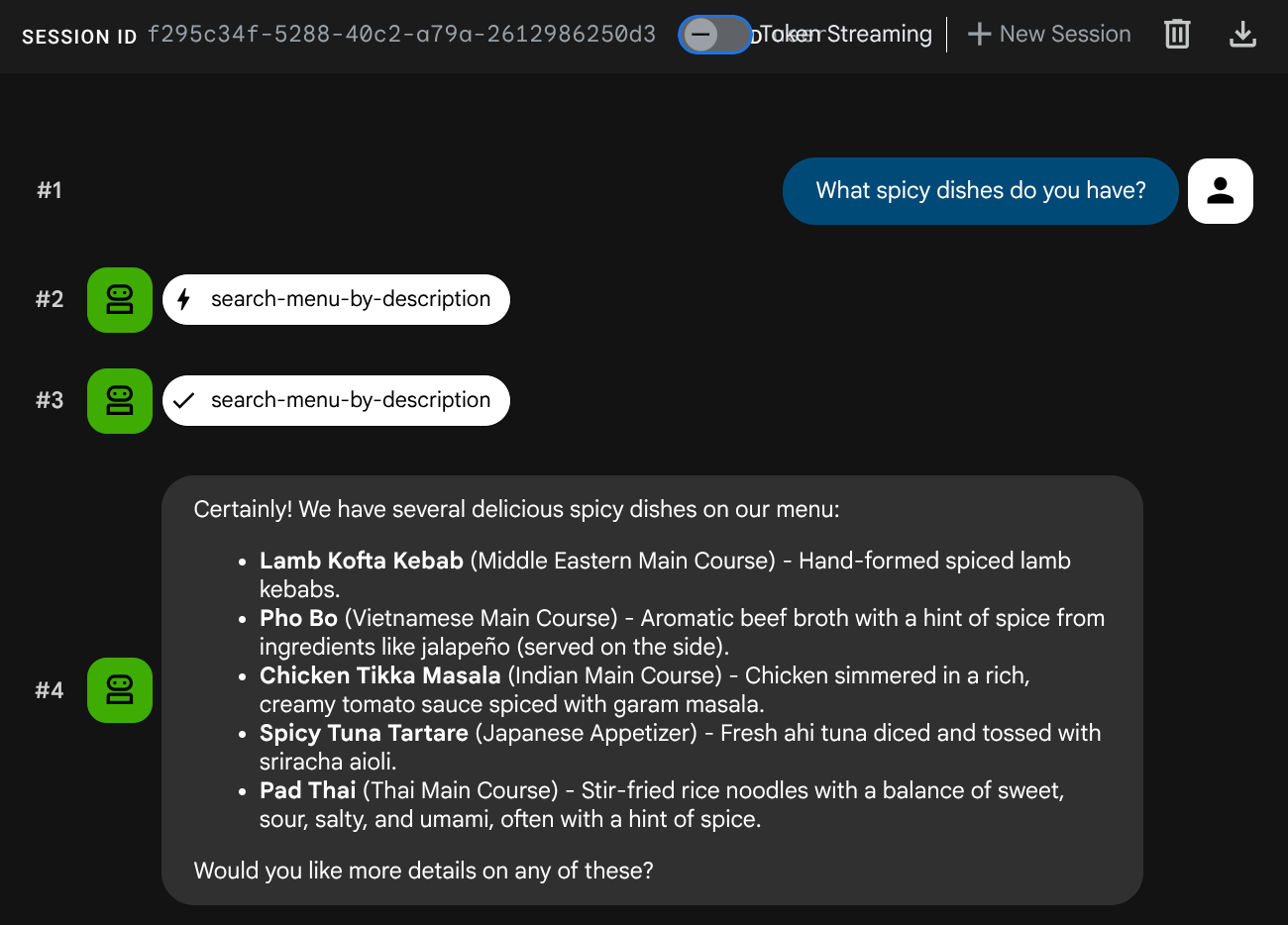
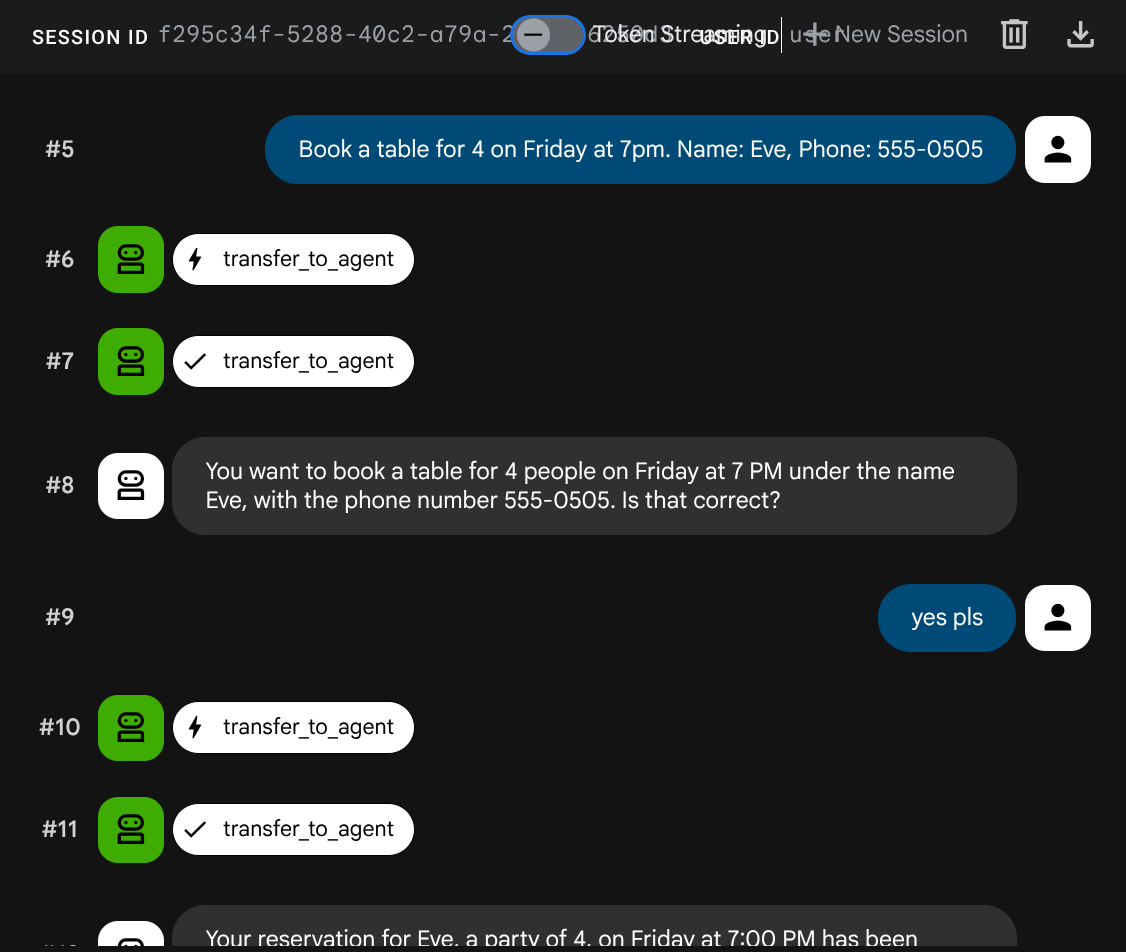
多代理系統已全面部署。Cloud Run 上的餐廳代理程式會在兩項後端服務之間協調運作:MCP Toolbox 用於菜單作業,而 A2A 預訂代理程式則位於 Agent Runtime。
11. 恭喜!
您已在 Google Cloud 上使用 A2A 通訊協定建構及部署多代理系統。
您已經瞭解的內容
- 建構 ADK 代理,使用工作階段狀態 (
ToolContext) 管理預訂資料,無需資料庫 - 使用 Agent Platform SDK 將 A2A 代理部署至 Agent Runtime
- 使用
RemoteA2aAgent做為子代理,從另一個 ADK 代理取用遠端 A2A 代理 - 逐步測試系統:本機 A2A → 已部署的 A2A → 部分整合 → 全面部署
清理
如要避免系統向您的 Google Cloud 帳戶收費,請刪除本程式碼研究室中建立的資源。
方法 1:刪除專案 (建議)
gcloud projects delete $GOOGLE_CLOUD_PROJECT
方法 2:刪除個別資源
# Delete the Agent Runtime deployment
uv run python -c "
import vertexai
from google.genai import types
vertexai.init(project='$GOOGLE_CLOUD_PROJECT', location='$REGION')
client = vertexai.Client(
    project='$GOOGLE_CLOUD_PROJECT', location='$REGION',
    http_options=types.HttpOptions(api_version='v1beta1'),
)
agent = client.agent_engines.get(name='$RESERVATION_AGENT_RESOURCE_NAME')
agent.delete(force=True)
print('Agent Runtime deployment deleted.')
"

# Delete Cloud Run services
gcloud run services delete restaurant-agent --region=$REGION --quiet
gcloud run services delete toolbox-service --region=$REGION --quiet

# Delete Cloud SQL instance
gcloud sql instances delete $DB_INSTANCE --quiet

# Delete GCS staging bucket
gsutil rm -r gs://$STAGING_BUCKET