

1. 简介
Cloud Armor 安全政策用于配置用户定义的规则,以在 Google 网络边缘(您的基础设施的上游)过滤流量。网络边缘安全政策可用于帮助保护和允许/阻止以以下端点类型为目标的流量:网络负载平衡器、协议转发和具有公共 IP 的虚拟机。
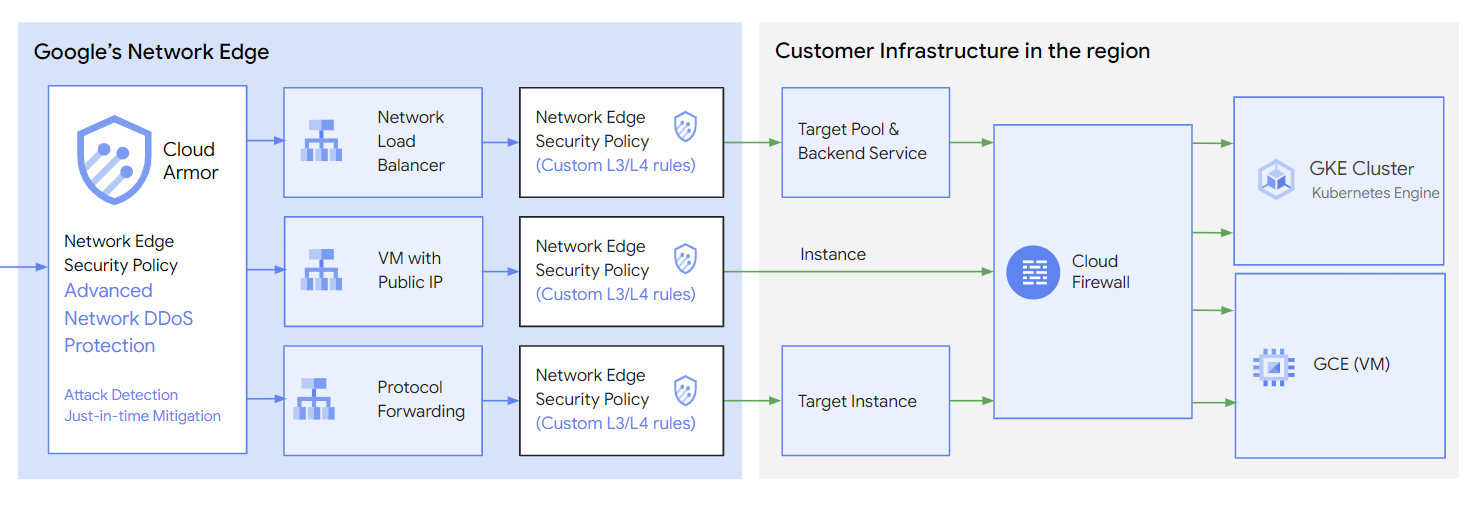
在此代码实验中,我们将演示如何配置具有用户定义规则的 Cloud Armor 安全政策,以防止 DDoS 攻击。

图 1. Cloud Armor,用于保护具有公共 IP 的虚拟机。
学习内容
- 配置了用户定义规则的 Cloud Armor 安全政策
- UDP 偏移配置和测试。
所需条件
- 了解 TCP/IP
- 了解 Unix/Linux 命令行
2. 准备工作
在 Cloud Shell 中,确保项目 ID 已设置
gcloud config list project
gcloud config set project [YOUR-PROJECT-NAME]
prodproject=YOUR-PROJECT-NAME
echo $prodproject
3. 创建目标 VPC 网络
在下一部分中,我们将设置 VPC 网络和相关的网络配置。Cloud Armor 网络边缘安全政策是基于区域的,我们在 asia-southeast1 区域中设置了所有相关资源。
VPC 网络
从 Cloud Shell
gcloud compute networks create ca4nlb --project=$prodproject --subnet-mode=custom
创建子网
从 Cloud Shell
gcloud compute networks subnets create ca4nlb-asia-southeast1 --project=$prodproject --range=10.0.0.0/24 --network=ca4nlb --region=asia-southeast1
创建防火墙规则。
在本部分中,我们将添加防火墙规则,以允许预期的 UDP 流量流向端口 10000。
在 Cloud Shell 中,创建防火墙规则以打开 UDP 端口 10000,以便进行后续测试。
gcloud compute firewall-rules create ca4nlb-udp10000 --allow udp:10000 --network ca4nlb --source-ranges 0.0.0.0/0 --enable-logging
在 Cloud Shell 中创建防火墙规则,以允许 IAP 连接到您的虚拟机实例。
gcloud compute firewall-rules create ca4nlb-iap-prod --network ca4nlb --allow tcp:22 --source-ranges=35.235.240.0/20 --enable-logging
4. 创建目标虚拟机实例
创建目标虚拟机以测试安全政策。此虚拟机应具有公共 IP 地址并打开 UDP 端口 10000。
通过 Cloud Shell 创建实例 targetvm
gcloud compute instances create targetvm \
--zone=asia-southeast1-b \
--image-family=debian-11 \
--image-project=debian-cloud \
--network-interface=network-tier=PREMIUM,nic-type=GVNIC,stack-type=IPV4_ONLY,subnet=ca4nlb-asia-southeast1 \
--shielded-secure-boot \
--shielded-vtpm \
--shielded-integrity-monitoring
5. 配置高级网络 DDoS 防护
从 Cloud Shell
 gcloud compute security-policies create ca_advanced_ddos \
     --type CLOUD_ARMOR_NETWORK \
     --region asia-southeast1

 gcloud compute security-policies update ca_advanced_ddos \
     --network-ddos-protection ADVANCED \
     --region asia-southeast1

 gcloud compute network-edge-security-services create caedgepolicy \
     --security-policy ca_advanced_ddos \
     --region asia-southeast1
6. 创建具有默认规则的网络边缘安全政策
创建网络边缘安全政策
从 Cloud Shell
gcloud alpha compute security-policies create customnetworkedge --type=CLOUD_ARMOR_NETWORK --region=asia-southeast1
修改默认规则
从 Cloud Shell
gcloud alpha compute security-policies rules update 2147483647 --security-policy=customnetworkedge --action=deny --region=asia-southeast1
7. 创建具有用户配置规则的网络边缘安全政策
用户预定义了 UDP 偏移量,并在 Cloud Armor 政策中进行了配置。具有此“偏移值”的数据包将通过政策检查并发送到后端虚拟机。在以下示例中,我们将定义两个具有不同值的“偏移量”。
第一个值位于 UDP 标头之后,与 2 字节 0x1700 完全匹配
第二个值是 UDP 标头的偏移量 8 字节,与 4 字节 0x12345678 完全匹配
上述预定义值将转换为 UDP 数据包位视图。

从 Cloud Shell
gcloud alpha compute security-policies add-user-defined-field customnetworkedge \
--user-defined-field-name=SIG1_AT_0 \
--base=udp --offset=8 --size=2 --mask=0xFF00 \
--region=asia-southeast1

gcloud alpha compute security-policies add-user-defined-field customnetworkedge \
--user-defined-field-name=SIG2_AT_8 \
--base=udp --offset=16 --size=4 --mask=0xFFFFFFFF \
--region=asia-southeast1

gcloud alpha compute security-policies rules create 1000 \
--security-policy=customnetworkedge \
--network-user-defined-fields="SIG1_AT_0;0x1700,SIG2_AT_8;0x12345678" \
--action=allow --region=asia-southeast1
8. 将安全政策附加到目标虚拟机
在 Cloud Shell 中,将安全政策附加到受保护的虚拟机。
gcloud alpha compute instances network-interfaces update targetvm \
--security-policy=customnetworkedge \
--security-policy-region=asia-southeast1 \
--network-interface=nic0 \
--zone=asia-southeast1-b
在 Cloud Shell 中描述目标虚拟机,您会看到安全政策已附加。记录公共 IP 以供后续测试使用。
gcloud alpha compute instances describe targetvm --zone=asia-southeast1-b

networkInterfaces:
- accessConfigs:
  - kind: compute#accessConfig
    name: External NAT
    natIP: 35.240.148.100
    networkTier: PREMIUM
    securityPolicy: https://www.googleapis.com/compute/alpha/projects/<project>/regions/asia-southeast1/securityPolicies/customnetworkedge
在 Cloud Shell 中,从受保护的虚拟机分离安全政策。
gcloud alpha compute instances network-interfaces update targetvm \
--network-interface=nic0 \
--zone=asia-southeast1-b \
--security-policy=
9. 准备测试资源。
创建测试 VPC 网络
从 Cloud Shell
gcloud compute networks create test --project=$prodproject --subnet-mode=custom
创建测试子网
从 Cloud Shell
gcloud compute networks subnets create test-asia-southeast1 --project=$prodproject --range=10.0.1.0/24 --network=test --region=asia-southeast1
创建防火墙
在 Cloud Shell 中创建防火墙规则,以允许 IAP 连接到您的虚拟机实例。
gcloud compute firewall-rules create test-iap-prod --network test --allow tcp:22 --source-ranges=35.235.240.0/20 --enable-logging
创建测试虚拟机
从 Cloud Shell
gcloud compute instances create test01 \
    --zone=asia-southeast1-b \
    --image-family=debian-11 \
    --image-project=debian-cloud \
    --network-interface=network-tier=PREMIUM,nic-type=GVNIC,stack-type=IPV4_ONLY,subnet=test-asia-southeast1 \
    --shielded-secure-boot \
    --shielded-vtpm \
    --shielded-integrity-monitoring
10. 验证
登录测试虚拟机控制台并安装数据包生成器 packit。
sudo apt install packit
按照 UDP 偏移设计,使用 packit 生成 UDP 数据包。我们模拟一个 (-t udp) 数据包,该数据包来自接口 (-s ens4) 源 IP 地址 (-s 10.0.1.2),具有源端口 (-S 10000),并发送到目标虚拟机目标 IP 地址 (-d 35.240.148.100),具有目标端口 (-D 10000)。数据包内容匹配值 (-p ‘0x 17 00 00 00 00 00 00 00 12 34 56 78’)。我们将发送 (-c 4) 个数据包。
sudo packit -m inject -t UDP -i ens4 -s 10.0.1.2 -d 35.240.148.100 -S 10000 -D 10000 -p '0x 17 00 00 00 00 00 00 00 12 34 56 78' -c 4
在目标虚拟机中,运行 tcpdump 以捕获 UDP 数据包。
sudo tcpdump port 10000 -v -n

tcpdump: listening on ens4, link-type EN10MB (Ethernet), snapshot length 262144 bytes
06:36:18.434106 IP (tos 0x0, ttl 128, id 17173, offset 0, flags [none], proto UDP (17), length 40)
    35.197.157.140.10000 > 10.0.0.2.10000: UDP, length 12
06:36:19.433656 IP (tos 0x0, ttl 128, id 55641, offset 0, flags [none], proto UDP (17), length 40)
    35.197.157.140.10000 > 10.0.0.2.10000: UDP, length 12
06:36:20.433935 IP (tos 0x0, ttl 128, id 27161, offset 0, flags [none], proto UDP (17), length 40)
    35.197.157.140.10000 > 10.0.0.2.10000: UDP, length 12
06:36:21.434150 IP (tos 0x0, ttl 128, id 46782, offset 0, flags [none], proto UDP (17), length 40)
    35.197.157.140.10000 > 10.0.0.2.10000: UDP, length 12
如果我们更改测试虚拟机中的流量模式,则无法捕获目标虚拟机中的任何数据包。
sudo packit -m inject -t UDP -i ens4 -s 10.148.0.6 -d 34.87.79.31 -S 10000 -D 10000 -p '0x 33 33 00 00 00 00 00 00 12 34 56 78' -c 4
11. 遥测
打开 Cloud 指标,使用以下 MQL 查询 NetworkSercurityPolicy 遥测数据。
fetch networksecurity.googleapis.com/RegionalNetworkSecurityPolicy
| metric 'networksecurity.googleapis.com/l3/external/packet_count'
| filter (resource.policy_name == 'customnetworkedge')
| align rate(1m)
| every 1m
| group_by [metric.blocked], [value_packet_count_mean: mean(value.packet_count)]
| group_by 1m, [value_packet_count_mean_mean: mean(value_packet_count_mean)]
| every 1m
使用匹配偏移命令生成大量流量。
sudo packit -m inject -t UDP -i ens4 -s 10.148.0.6 -d 34.87.79.31 -S 10000 -D 10000 -p '0x 17 00 00 00 00 00 00 00 12 34 56 78' -c 1000000 -w 0.001

[result]
Injected: 1000000  Packets/Sec: 10309.27  Bytes/Sec: 412371.13  Errors: 0
使用不匹配偏移命令生成大量流量。
sudo packit -m inject -t UDP -i ens4 -s 10.148.0.6 -d 34.87.79.31 -S 10000 -D 10000 -p '0x 11 00 00 00 00 00 00 00 12 34 56 78' -c 1000000 -w 0.001

[result]
Injected: 1000000  Packets/Sec: 10309.27  Bytes/Sec: 412371.13  Errors: 0
遥测数据按 policy_name 过滤,并按 blocked 分组。蓝线表示政策规则允许的流量。绿线表示被政策规则屏蔽的流量。

12. 清理步骤
通过终端中的单个 Cloud Shell 删除实验组件
gcloud compute instances delete targetvm --zone=asia-southeast1-b

gcloud compute firewall-rules delete ca4nlb-udp10000

gcloud compute firewall-rules delete ca4nlb-iap-prod

gcloud compute networks subnets delete ca4nlb-asia-southeast1 --region=asia-southeast1

gcloud compute networks delete ca4nlb

gcloud alpha compute security-policies delete customnetworkedge --region=asia-southeast1

gcloud alpha compute network-edge-security-services delete caedgepolicy --region=asia-southeast1

gcloud alpha compute security-policies delete ca_advanced_ddos --region=asia-southeast1

gcloud compute instances delete test01 --zone=asia-southeast1-b

gcloud compute firewall-rules delete test-iap-prod

gcloud compute networks subnets delete test-asia-southeast1 --region=asia-southeast1

gcloud compute networks delete test
13. 恭喜!
恭喜您完成此 Codelab。
所学内容
- 具有客户定义规则的 Cloud Armor 安全政策