

1. 總覽
AI 代理的自主運作、學習和與環境互動能力,可協助達成目標,因此迅速受到歡迎,並徹底改變工作自動化和決策方式。
但具體來說,要如何建構代理程式?本程式碼研究室將協助您入門,說明如何建構可轉換不同國家/地區貨幣的貨幣代理程式。接著,您將建立旅行社代理程式,並連結至幣別代理程式。目標是帶您瞭解最新技術,協助您解讀網路上常見的縮寫字 (MCP、ADK、A2A),並瞭解這些技術如何搭配運作。
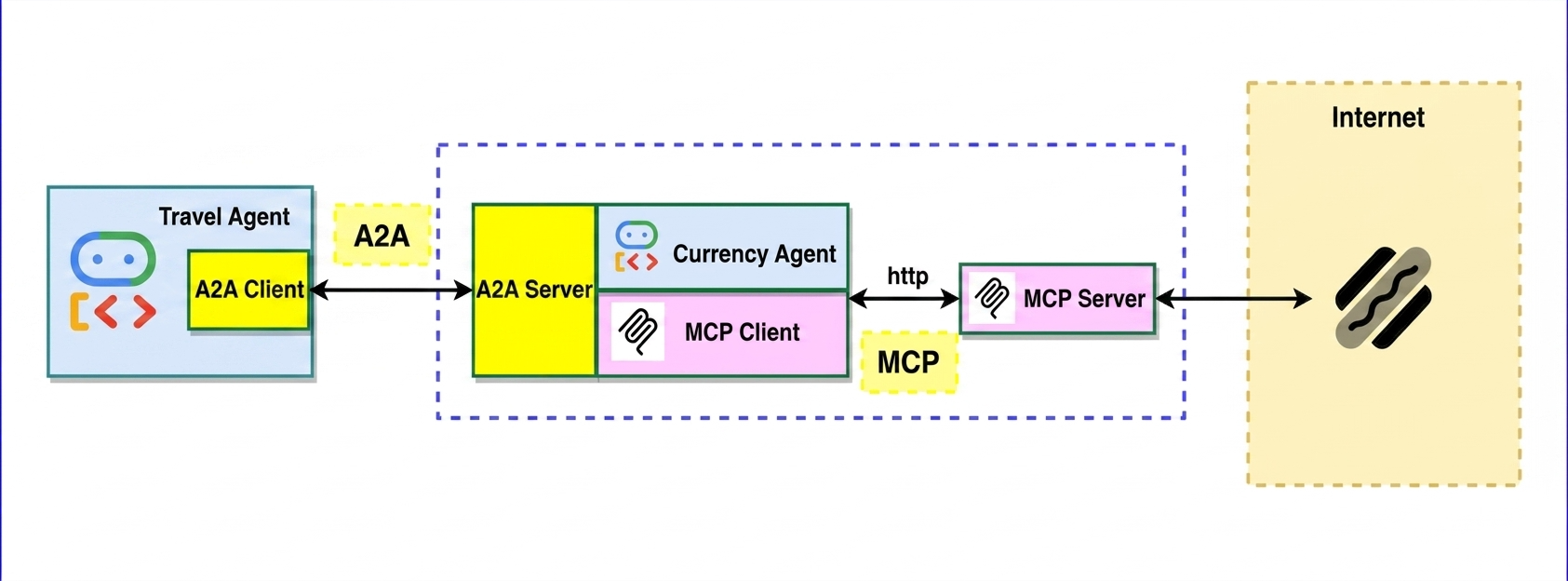
Model Context Protocol (MCP)
Model Context Protocol (MCP) 是一項開放通訊協定,可將應用程式為 LLM 提供脈絡資訊的方式標準化。MCP 提供標準化方式,可將 AI 模型連結至資源、提示和工具。
Agent Development Kit (ADK)
Agent Development Kit (ADK) 是彈性十足的協調框架,可用於開發及部署 AI 代理。ADK 不限於特定模型和部署環境,且可與其他架構相容。ADK 的設計宗旨是讓代理開發作業更貼近軟體開發,方便開發人員建立、部署及自動調度管理代理式架構,從簡單的工作到複雜的工作流程,都能輕鬆完成。
Agent2Agent (A2A) 通訊協定
Agent2Agent (A2A) 通訊協定是一項開放標準,旨在讓 AI 代理順暢地通訊及協作。就像 MCP 提供標準化方式,讓 LLM 存取資料和工具一樣,A2A 也提供標準化方式,讓代理與其他代理通訊!在代理是使用各種架構和由不同供應商建構的世界中,A2A 提供通用語言,打破資料孤島並促進互通性。
課程內容
- 如何建立本機 MCP 伺服器
- 將 MCP 伺服器部署至 Cloud Run
- 如何使用 Agent Development Kit 建構可使用 MCP 工具的代理
- 如何將 ADK 代理公開為 A2A 伺服器
- 使用 A2A 用戶端測試 A2A 伺服器
- 如何建構代理,透過 A2A 通訊協定與其他代理通訊
軟硬體需求
2. 事前準備
建立專案
如果沒有 Google Cloud 專案,請先建立一個。
在 Google Cloud 控制台的專案選取器頁面中,選取或建立 Google Cloud 專案。
此外,請確認 Cloud 專案已啟用計費功能。瞭解如何檢查專案是否已啟用計費功能。
啟用 Cloud Shell
Google Cloud Shell 是互動式開發環境,直接在 Google Cloud 控制台中提供,這是開始使用 Google Cloud 最簡單的方式,不必在本機安裝工具。
按一下這個連結,啟用 Cloud Shell。點選 Cloud Shell 中的對應按鈕,即可在 Cloud Shell 終端機 (用於執行雲端指令) 和編輯器 (用於建構專案) 之間切換。
連至 Cloud Shell 後,請使用下列指令檢查驗證是否已完成,專案是否已設為獲派的專案 ID:
gcloud auth list
在 Cloud Shell 中執行下列指令,確認 gcloud 指令知道您的專案。
gcloud config list project
使用下列指令設定專案:
export PROJECT_ID=<YOUR_PROJECT_ID>
gcloud config set project $PROJECT_ID
啟用 Cloud API
使用下列指令啟用必要的 API。這項作業可能需要幾分鐘才能完成。
gcloud services enable cloudresourcemanager.googleapis.com \
                       servicenetworking.googleapis.com \
                       run.googleapis.com \
                       cloudbuild.googleapis.com \
                       artifactregistry.googleapis.com \
                       aiplatform.googleapis.com \
                       compute.googleapis.com
如要瞭解 gcloud 指令和用法,請參閱說明文件。
取得程式碼
複製存放區:
git clone https://github.com/jackwotherspoon/currency-agent.git
cd currency-agent
uv 用於管理依附元件,Cloud Shell 已安裝此工具,但如果您在本機執行程式碼研究室,可以按照下列步驟安裝:
# macOS and Linux
curl -LsSf https://astral.sh/uv/install.sh | sh

# Windows (uncomment below line)
# powershell -ExecutionPolicy ByPass -c "irm https://astral.sh/uv/install.ps1 | iex"
執行下列指令,透過 .env 檔案設定環境變數:
echo "GOOGLE_GENAI_USE_ENTERPRISE=TRUE" >> .env \
&& echo "GOOGLE_CLOUD_PROJECT=$PROJECT_ID" >> .env \
&& echo "GOOGLE_CLOUD_LOCATION=global" >> .env
3. 建立本機 MCP 伺服器
在協調貨幣代理程式之前,您必須先建立 MCP 伺服器,公開代理程式所需的工具。
MCP 伺服器可讓您編寫輕量型程式,將特定功能 (例如擷取匯率) 公開為工具。代理 (甚至多個代理) 隨後就能使用標準化 Model Context Protocol (MCP) 存取這些工具。
您可以運用 FastMCP Python 套件建立 MCP 伺服器,公開名為 get_exchange_rate 的單一工具。get_exchange_rate 工具會透過網際網路呼叫 Frankfurter API,取得兩種貨幣之間的目前匯率。
MCP 伺服器的程式碼位於 mcp-server/server.py 檔案中:
import logging
import os

import httpx
from fastmcp import FastMCP

# Set up logging
logger = logging.getLogger(__name__)
logging.basicConfig(format="[%(levelname)s]: %(message)s", level=logging.INFO)

mcp = FastMCP("Currency MCP Server 💵")

@mcp.tool()
def get_exchange_rate(
    currency_from: str = 'USD',
    currency_to: str = 'EUR',
    currency_date: str = 'latest',
):
    """Use this to get current exchange rate.

    Args:
        currency_from: The currency to convert from (e.g., "USD").
        currency_to: The currency to convert to (e.g., "EUR").
        currency_date: The date for the exchange rate or "latest". Defaults to "latest".

    Returns:
        A dictionary containing the exchange rate data, or an error message if the request fails.
    """
    logger.info(f"--- 🛠️ Tool: get_exchange_rate called for converting {currency_from} to {currency_to} ---")
    try:
        response = httpx.get(
            f'https://api.frankfurter.app/{currency_date}',
            params={'from': currency_from, 'to': currency_to},
        )
        response.raise_for_status()

        data = response.json()
        if 'rates' not in data:
            return {'error': 'Invalid API response format.'}
        logger.info(f'✅ API response: {data}')
        return data
    except httpx.HTTPError as e:
        return {'error': f'API request failed: {e}'}
    except ValueError:
        return {'error': 'Invalid JSON response from API.'}

if __name__ == "__main__":
    logger.info(f"🚀 MCP server started on port {os.getenv('PORT', 8080)}")
    # Could also use 'sse' transport, host="0.0.0.0" required for Cloud Run.
    asyncio.run(
        mcp.run_async(
            transport="http",
            host="0.0.0.0",
            port=os.getenv("PORT", 8080),
        )
    )
如要在本機啟動 MCP 伺服器,請開啟終端機並執行下列指令 (伺服器會在 http://localhost:8080 啟動):
uv run mcp-server/server.py
測試 MCP 伺服器是否正常運作,以及是否可使用 Model Context Protocol 存取 get_exchange_rate 工具。
在新的終端機視窗中 (以免停止本機 MCP 伺服器),執行下列指令:
uv run mcp-server/test_server.py
系統應會輸出 1 美元兌換歐元的目前匯率:
--- 🛠️ Tool found: get_exchange_rate ---
--- 🪛 Calling get_exchange_rate tool for USD to EUR ---
--- ✅ Success: {
  "amount": 1.0,
  "base": "USD",
  "date": "2025-05-26",
  "rates": {
    "EUR": 0.87866
  }
} ---
太棒了!您已成功建立可正常運作的 MCP 伺服器,並提供代理可存取的工具。
在前往下一個工作站之前,請在啟動 MCP 伺服器的終端機中執行 Ctrl+C (或 Mac 上的 Command+C),停止在本機執行的 MCP 伺服器。
4. 將 MCP 伺服器部署至 Cloud Run
現在您已準備好將 MCP 伺服器部署至 Cloud Run,做為遠端 MCP 伺服器 🚀☁️
遠端執行 MCP 伺服器的優點
在 Cloud Run 遠端執行 MCP 伺服器可帶來多項優勢:
- 📈擴充性:Cloud Run 的設計宗旨是快速水平擴展,處理所有傳入要求。Cloud Run 會根據需求自動調度 MCP 伺服器資源。
- 👥集中式伺服器:您可以透過 IAM 權限,與團隊成員共用集中式 MCP 伺服器的存取權,讓他們從本機連線至該伺服器,不必在本機執行自己的伺服器。如果 MCP 伺服器有任何變更,所有團隊成員都會受益。
- 🔐安全性:Cloud Run 可輕鬆強制執行已驗證的要求。這樣一來,只有安全連線才能存取 MCP 伺服器,防止未經授權的存取。
變更至 mcp-server 目錄:
cd mcp-server
將 MCP 伺服器部署至 Cloud Run:
gcloud run deploy mcp-server --no-allow-unauthenticated --region=us-central1 --source .
如果服務部署成功,您會看到類似以下的訊息:
Service [mcp-server] revision [mcp-server-12345-abc] has been deployed and is serving 100 percent of traffic.
驗證 MCP 用戶端
由於您指定 --no-allow-unauthenticated 需要驗證,因此連線至遠端 MCP 伺服器的任何 MCP 用戶端都必須通過驗證。
如要進一步瞭解這個主題,請參閱在 Cloud Run 託管 MCP 伺服器的官方文件,瞭解 MCP 用戶端執行位置的相關資訊。
您必須執行 Cloud Run Proxy,在本機電腦上建立通過驗證的通道,連線至遠端 MCP 伺服器。
根據預設,Cloud Run 服務的網址會要求所有要求都必須使用「Cloud Run 叫用者」 (roles/run.invoker) IAM 角色授權。這項 IAM 政策繫結可確保使用強大的安全機制,驗證本機 MCP 用戶端。
請確認您或嘗試存取遠端 MCP 伺服器的任何團隊成員,都已將 roles/run.invoker IAM 角色繫結至 IAM 主體 (Google Cloud 帳戶)。
gcloud run services proxy mcp-server --region=us-central1
您應該會看到以下的輸出內容:
Proxying to Cloud Run service [mcp-server] in project [<YOUR_PROJECT_ID>] region [us-central1]
http://127.0.0.1:8080 proxies to https://mcp-server-abcdefgh-uc.a.run.app
傳送至 http://127.0.0.1:8080 的所有流量都會經過驗證,並轉送至遠端 MCP 伺服器。
測試遠端 MCP 伺服器
在新終端機中返回根資料夾,然後重新執行 mcp-server/test_server.py 檔案,確認遠端 MCP 伺服器正常運作。
cd ..
uv run mcp-server/test_server.py
您應該會看到與在本機執行伺服器時類似的輸出內容:
--- 🛠️ Tool found: get_exchange_rate ---
--- 🪛 Calling get_exchange_rate tool for USD to EUR ---
--- ✅ Success: {
  "amount": 1.0,
  "base": "USD",
  "date": "2025-05-26",
  "rates": {
    "EUR": 0.87866
  }
} ---
如要確認是否確實呼叫遠端伺服器,可以查詢已部署的 Cloud Run MCP 伺服器記錄:
gcloud run services logs read mcp-server --region us-central1 --limit 5
記錄中應會顯示下列輸出內容:
2025-06-04 14:28:29,871 [INFO]: --- 🛠️ Tool: get_exchange_rate called for converting USD to EUR ---
2025-06-04 14:28:30,610 [INFO]: HTTP Request: GET https://api.frankfurter.app/latest?from=USD&to=EUR "HTTP/1.1 200 OK"
2025-06-04 14:28:30,611 [INFO]: ✅ API response: {'amount': 1.0, 'base': 'USD', 'date': '2025-06-03', 'rates': {'EUR': 0.87827}}
您現在有了遠端 MCP 伺服器,可以繼續建立代理程式!🤖
5. 使用 ADK 建立代理
您已部署 MCP 伺服器,現在要使用 Agent Development Kit (ADK) 建立貨幣代理。
ADK 可輕鬆建立代理,並內建 MCP 工具支援功能,讓代理連線至 MCP 伺服器。貨幣代理會使用 ADK 的 MCPToolset 類別存取 get_exchange_rate 工具。
貨幣代理程式碼位於 currency_agent/agent.py:
import logging
import os

from dotenv import load_dotenv
from google.adk.agents import LlmAgent
from google.adk.a2a.utils.agent_to_a2a import to_a2a
from google.adk.tools.mcp_tool import MCPToolset, StreamableHTTPConnectionParams

logger = logging.getLogger(__name__)
logging.basicConfig(format="[%(levelname)s]: %(message)s", level=logging.INFO)

load_dotenv()

SYSTEM_INSTRUCTION = (
    "You are a specialized assistant for currency conversions. "
    "Your sole purpose is to use the 'get_exchange_rate' tool to answer questions about currency exchange rates. "
    "If the user asks about anything other than currency conversion or exchange rates, "
    "politely state that you cannot help with that topic and can only assist with currency-related queries. "
    "Do not attempt to answer unrelated questions or use tools for other purposes."
)

logger.info("--- 🔧 Loading MCP tools from MCP Server... ---")
logger.info("--- 🤖 Creating ADK Currency Agent... ---")

root_agent = LlmAgent(
    model="gemini-3.7-flash",
    name="currency_agent",
    description="An agent that can help with currency conversions",
    instruction=SYSTEM_INSTRUCTION,
    tools=[
        MCPToolset(
            connection_params=StreamableHTTPConnectionParams(
                url=os.getenv("MCP_SERVER_URL", "http://localhost:8080/mcp")
            )
        )
    ],
)
如要快速測試貨幣代理程式,可以執行 adk web,透過 ADK 的開發 UI 存取:
uv run adk web --allow_origins "regex:https://.*\.cloudshell\.dev"
在瀏覽器中前往 http://localhost:8000,即可查看及測試代理!
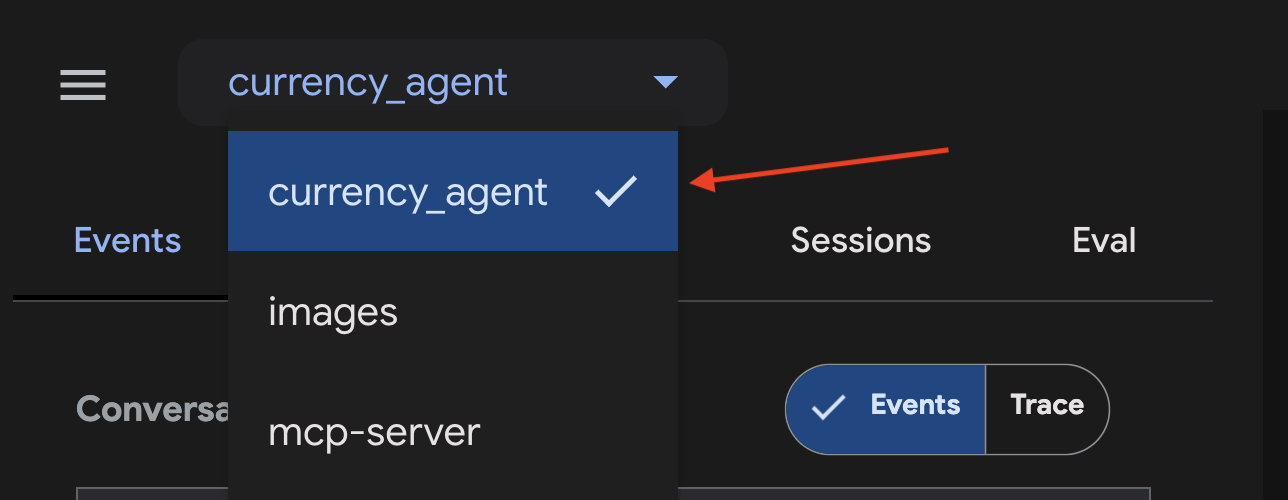
確認網頁使用者介面左上角已選取 currency_agent 做為代理程式。
在對話區域中詢問代理,例如「250 加幣等於多少美元?」。代理程式應會先呼叫 get_exchange_rate MCP 工具,然後再提供回覆。
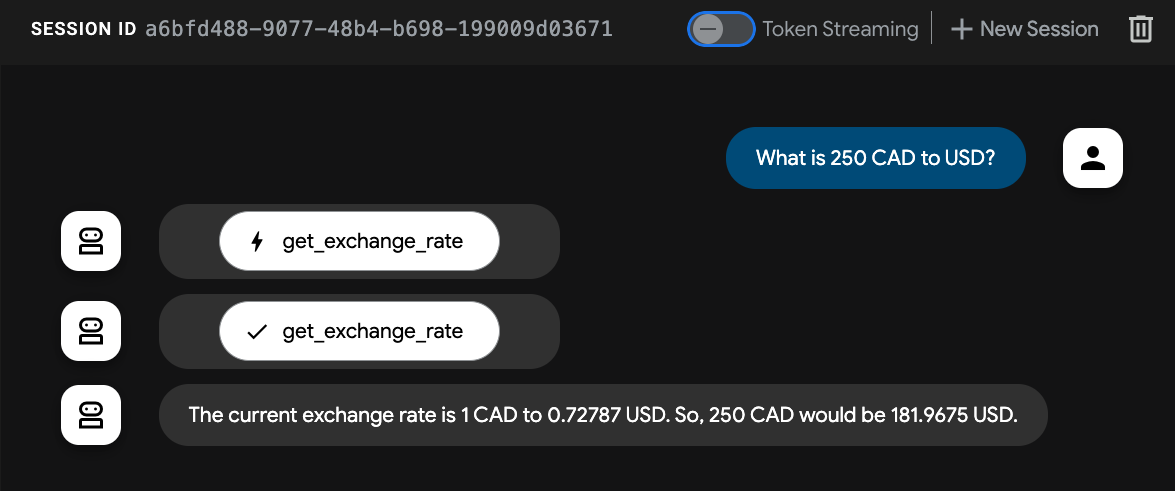
代理程式運作正常!可處理與貨幣換算 💸 相關的查詢。
6. Agent2Agent (A2A) 通訊協定
Agent2Agent (A2A) 通訊協定是一項開放標準,旨在讓 AI 代理順暢地通訊及協作。這樣一來,使用不同架構和由不同供應商建構的代理,就能以通用語言互相溝通,打破資料孤島並促進互通性。
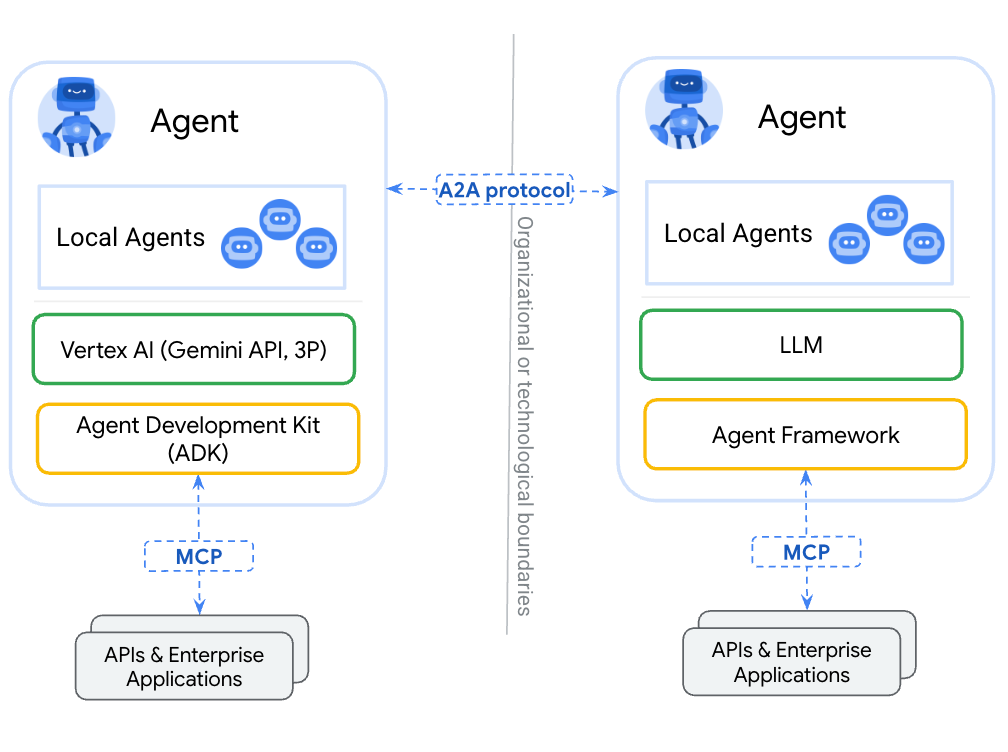
A2A 可讓代理程式執行下列操作:
- 探索:使用標準化的代理資訊卡,尋找其他代理並瞭解其技能 (AgentSkill) 和能力 (AgentCapabilities)。
- 通訊:安全地交換訊息和資料。
- 協作:指派工作及協調行動,以達成複雜目標。
A2A 通訊協定透過「代理資訊卡」等機制促進這類通訊,代理可使用這些資訊卡宣傳自身功能和連線資訊,就像數位名片一樣。
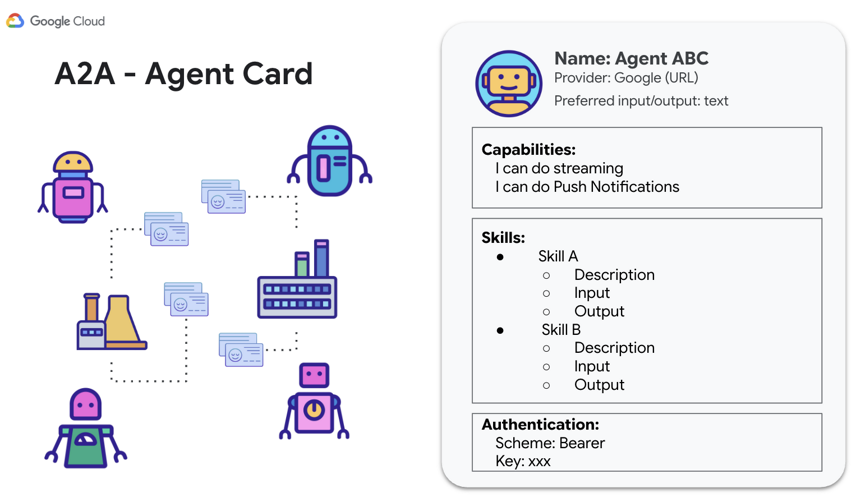
現在請使用 A2A 公開幣別代理,以便其他代理和用戶端呼叫。
A2A Python SDK
A2A Python SDK 為上述各項資源提供 Pydantic 模型:AgentSkill、AgentCapabilities 和 AgentCard。這個介面可加快開發速度,並與 A2A 通訊協定整合。
AgentSkill:向其他代理商宣傳貨幣代理商有 get_exchange_rate 工具的方式:
# A2A Agent Skill definition
skill = AgentSkill(
    id='get_exchange_rate',
    name='Currency Exchange Rates Tool',
    description='Helps with exchange values between various currencies',
    tags=['currency conversion', 'currency exchange'],
    examples=['What is exchange rate between USD and GBP?'],
)
然後,在 AgentCard 中,系統會列出代理程式的技能和能力,以及代理程式可處理的輸入和輸出模式等其他詳細資料:
# A2A Agent Card definition
agent_card = AgentCard(
    name='Currency Agent',
    description='Helps with exchange rates for currencies',
    url=f'http://{host}:{port}/',
    version='1.0.0',
    defaultInputModes=["text"],
    defaultOutputModes=["text"],
    capabilities=AgentCapabilities(streaming=True),
    skills=[skill],
)
現在就來整合貨幣代理程式,展現 A2A 的強大功能!
7. 將 Currency Agent 公開為 A2A 伺服器
ADK 可簡化建構及連結代理的程序,並為您使用 A2A 通訊協定。如要將現有的 ADK 代理設為可存取 (公開) 的 A2A 伺服器,請使用 ADK 的 to_a2a(root_agent) 函式 (詳情請參閱 ADK 說明文件)。
to_a2a 函式會轉換現有代理,使其能與 A2A 搭配運作,並透過 uvicorn 將其公開為伺服器。也就是說,如果您打算將代理程式投入正式環境,就能更嚴格地控管要公開的內容。to_a2a() 函式會在幕後使用 A2A Python SDK,根據代理程式碼自動生成代理資訊卡。
查看 currency_agent/agent.py 檔案內部,您會看到 to_a2a 的使用方式,以及貨幣代理程式如何以 A2A 伺服器形式公開,而且只需要兩行程式碼!
from google.adk.a2a.utils.agent_to_a2a import to_a2a
# ... see file for full code

# Make the agent A2A-compatible
a2a_app = to_a2a(root_agent, port=10000)
如要執行 A2A 伺服器,請在新終端機中執行下列指令:
uv run uvicorn currency_agent.agent:a2a_app --host localhost --port 10000
如果伺服器成功啟動,輸出內容會如下所示,表示伺服器正在連接埠 10000 上執行:
[INFO]: --- 🔧 Loading MCP tools from MCP Server... ---
[INFO]: --- 🤖 Creating ADK Currency Agent... ---
INFO:     Started server process [45824]
INFO:     Waiting for application startup.
INFO:     Application startup complete.
INFO:     Uvicorn running on http://localhost:10000 (Press CTRL+C to quit)
貨幣代理現在已成功以 A2A 伺服器的形式執行,可供其他代理或用戶端使用 A2A 通訊協定呼叫!
確認遠端代理程式正在執行
如要再次確認代理程式是否正常運作,請前往 to_a2a() 函式自動產生的貨幣代理程式卡片網址。
在瀏覽器中前往 http://localhost:10000/.well-known/agent-card.json
您應該會看到下列代理程式資訊卡:
{
  "capabilities": {

  },
  "defaultInputModes": [
    "text/plain"
  ],
  "defaultOutputModes": [
    "text/plain"
  ],
  "description": "An agent that can help with currency conversions",
  "name": "currency_agent",
  "preferredTransport": "JSONRPC",
  "protocolVersion": "0.3.0",
  "skills": [
    {
      "description": "An agent that can help with currency conversions I am a specialized assistant for currency conversions. my sole purpose is to use the 'get_exchange_rate' tool to answer questions about currency exchange rates. If the user asks about anything other than currency conversion or exchange rates, politely state that I cannot help with that topic and can only assist with currency-related queries. Do not attempt to answer unrelated questions or use tools for other purposes.",
      "id": "currency_agent",
      "name": "model",
      "tags": [
        "llm"
      ]
    },
    {
      "description": "Use this to get current exchange rate.\n\nArgs:\n    currency_from: The currency to convert from (e.g., \"USD\").\n    currency_to: The currency to convert to (e.g., \"EUR\").\n    currency_date: The date for the exchange rate or \"latest\". Defaults to \"latest\".\n\nReturns:\n    A dictionary containing the exchange rate data, or an error message if the request fails.",
      "id": "currency_agent-get_exchange_rate",
      "name": "get_exchange_rate",
      "tags": [
        "llm",
        "tools"
      ]
    }
  ],
  "supportsAuthenticatedExtendedCard": false,
  "url": "http://localhost:10000",
  "version": "0.0.1"
}
測試 A2A 伺服器
現在可以使用 A2A 向伺服器傳送一些要求,測試伺服器!
A2A Python SDK 提供 a2a.client.Client 類別,可簡化這項程序。
currency_agent/test_a2aclient.py 檔案包含的程式碼會說明如何擷取代理程式資訊卡,以及如何將訊息傳送至 A2A 伺服器。
# ... see file for full code

async def get_agent_card():
    """Get the agent card."""
    print(f"🔄 Fetching the agent card at {AGENT_URL}")

    async with httpx.AsyncClient() as httpx_client:
        resolver = A2ACardResolver(
            httpx_client=httpx_client,
            base_url=AGENT_URL,
        )
        public_agent_card = await resolver.get_agent_card()
        print("✅ Successfully fetched the agent card")
    return public_agent_card


async def send_message(text_query: str) -> None:
    """
    Send a text query to the agent and print the response.
    """
    public_agent_card = await get_agent_card()

    print("🔄 Initializing a non-streaming client")
    config = ClientConfig(streaming=False)
    client = await create_client(agent=public_agent_card, client_config=config)

    message = new_text_message(text_query, role=Role.ROLE_USER)
    print("Sending request:")
    request = SendMessageRequest(message=message)
    print(request)

    print("Response:")
    async for chunk in client.send_message(request):
        print(chunk)
    await client.close()
使用下列指令執行測試:
uv run currency_agent/test_a2aclient.py
測試執行成功後,會發生下列情況:
🔄 Fetching the agent card at http://localhost:10000
✅ Successfully fetched the agent card
====================================================
                     AgentCard
====================================================
--- General ---
Name        : currency_agent
Description : An agent that can help with currency conversions
Version     : 0.0.1

--- Interfaces ---
  [0] http://localhost:10000  (JSONRPC 1.0)

--- Capabilities ---
Streaming           : False
Push notifications  : False
Extended agent card : False

--- I/O Modes ---
Input  : text/plain
Output : text/plain

--- Skills ---
----------------------------------------------------
  ID          : currency_agent
  Name        : model
  Description : An agent that can help with currency conversions
  Tags        : llm
----------------------------------------------------
  ID          : currency_agent-get_exchange_rate
  Name        : get_exchange_rate
  Description : Use this to get current exchange rate.
  Tags        : llm, tools
====================================================
🔄 Fetching the agent card at http://localhost:10000
✅ Successfully fetched the agent card
🔄 Initializing a non-streaming client
Sending request:
message {
  message_id: "5d190c88-336e-4a22-925d-e2af49cf4bad"
  role: ROLE_USER
  parts {
    text: "how much is 100 USD in GBP?"
  }
}

Response:
task {
  id: "e6f311bb-654a-477f-82a9-81c7a48f7b81"
  context_id: "672e351b-0ff3-4aed-a059-868b383c41a0"
  status {
    state: TASK_STATE_COMPLETED
    timestamp {
      seconds: 1787836031
      nanos: 994786000
    }
  }
  artifacts {
    artifact_id: "e0a05ac8-25c7-471c-a33c-1073fe48cbb8"
    parts {
      text: "100 USD is currently equal to approximately **73.37 GBP** (at an exchange rate of 1 USD = 0.73368 GBP)."
    }
  }
  ...
成功了!您已成功測試,可透過 A2A 通訊協定和 A2A 用戶端與貨幣代理通訊!🎉
如需更多 A2A 範例,請參閱 GitHub 上的 a2a-samples 存放區。
8. 透過 A2A 使用遠端 Currency Agent
在上一個步驟中,您使用 A2A 用戶端透過 A2A 與 Currency Agent 通訊。
在這個步驟中,我們來看看如何從另一個 Travel Agent,將 Currency Agent 視為遠端代理取用。
旅行社的代碼位於 travel_agent/agent.py:
import logging
import os

from dotenv import load_dotenv
from google.adk.agents import LlmAgent
from google.adk.tools.agent_tool import AgentTool
from google.adk.agents.remote_a2a_agent import RemoteA2aAgent, AGENT_CARD_WELL_KNOWN_PATH

logger = logging.getLogger(__name__)
logging.basicConfig(format="[%(levelname)s]: %(message)s", level=logging.INFO)

load_dotenv()

SYSTEM_INSTRUCTION = (
    "You are a helpful travel assistant. You help users plan trips, recommend places, "
    "and answer travel-related questions. "
    "Whenever a user asks about currency exchange rates or money conversions, "
    "delegate the request to the 'currency_agent' sub-agent."
)

CURRENCY_AGENT_URL = os.getenv("CURRENCY_AGENT_URL", "http://localhost:10000")

logger.info(
    "--- 🔗 Connecting to Remote A2A Currency Agent at %s... ---",
    CURRENCY_AGENT_URL,
)

currency_remote_agent = RemoteA2aAgent(
    name="currency_agent",
    agent_card=f"{CURRENCY_AGENT_URL}{AGENT_CARD_WELL_KNOWN_PATH}",
    description="An agent that can help with currency conversions and exchange rates.",
)

logger.info("--- 🤖 Creating ADK Travel Agent... ---")

root_agent = LlmAgent(
    model="gemini-3.7-flash",
    name="travel_agent",
    description="A travel assistant that can help plan trips and convert currencies via the remote currency agent.",
    instruction=SYSTEM_INSTRUCTION,
    tools=[AgentTool(agent=currency_remote_agent)],
)
請注意,貨幣代理程式是透過 RemoteA2aAgent 存取。
執行 adk web 測試旅遊代理:
uv run adk web --allow_origins "regex:https://.*\.cloudshell\.dev"
在瀏覽器中前往 http://localhost:8000,即可查看及測試代理。
確認網頁使用者介面左上角已選取 travel_agent 做為代理程式。
在對話區域中詢問代理,例如「250 加幣等於多少美元?」。
旅行社服務專員應會先currency_agent遠端通話,然後再提供回覆。
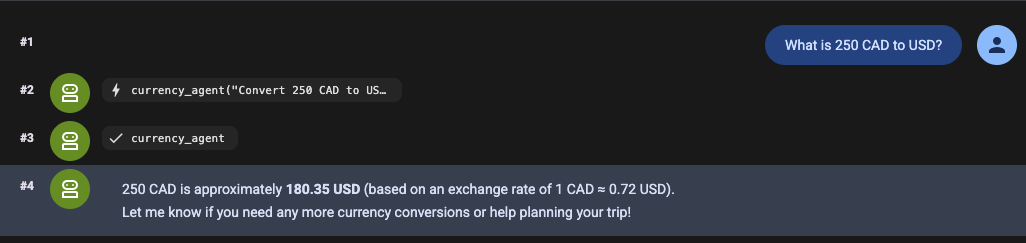
代理程式運作正常!透過 A2A 呼叫遠端代理,處理與貨幣換算 💸 相關的查詢!
9. 恭喜
恭喜!您已成功建構及部署遠端 MCP 伺服器,使用 Agent Development Kit (ADK) 建立可透過 MCP 連線至工具的貨幣代理,並使用 Agent2Agent (A2A) 通訊協定公開代理。接著,您建立旅遊代理,透過 A2A 與貨幣代理進行遠端通訊!
請點選這裡,查看完整程式碼說明文件。
想部署代理程式嗎?Gemini Enterprise Agent Platform 的 Agent Runtime 提供代管體驗,可將 AI 代理部署至正式環境!
涵蓋內容
- 如何建立本機 MCP 伺服器
- 將 MCP 伺服器部署至 Cloud Run
- 如何使用 Agent Development Kit 建構可使用 MCP 工具的代理
- 如何將 ADK 代理公開為 A2A 伺服器
- 使用 A2A 用戶端測試 A2A 伺服器
- 如何建構代理,透過 A2A 通訊協定與其他代理通訊
清除所用資源
如要避免系統向您的 Google Cloud 帳戶收取本實驗室所用資源的費用,請按照下列步驟操作: