

1. 總覽
Confidential GKE (CGKE) 節點可確保工作負載中的資料在使用時經過加密。將 vTPM 裝置公開給 CGKE 工作負載,可讓工作負載使用 vTPM 功能。在本程式碼研究室中,您將瞭解 vTPM 的功能,以及如何使用 cc-device-plugin 運用 Intel TDX 和 AMD SEV-SNP 硬體驗證。
- 透過 vTPM 遠端認證,遠端人員可以驗證代管工作負載的 CGKE 節點是否在機密虛擬機器 (CVM) 上執行。
- vTPM 授權和 vTPM 封存。
- 使用公開的 Intel TDX 和 AMD SEV-SNP 客戶端裝置進行硬體認證。
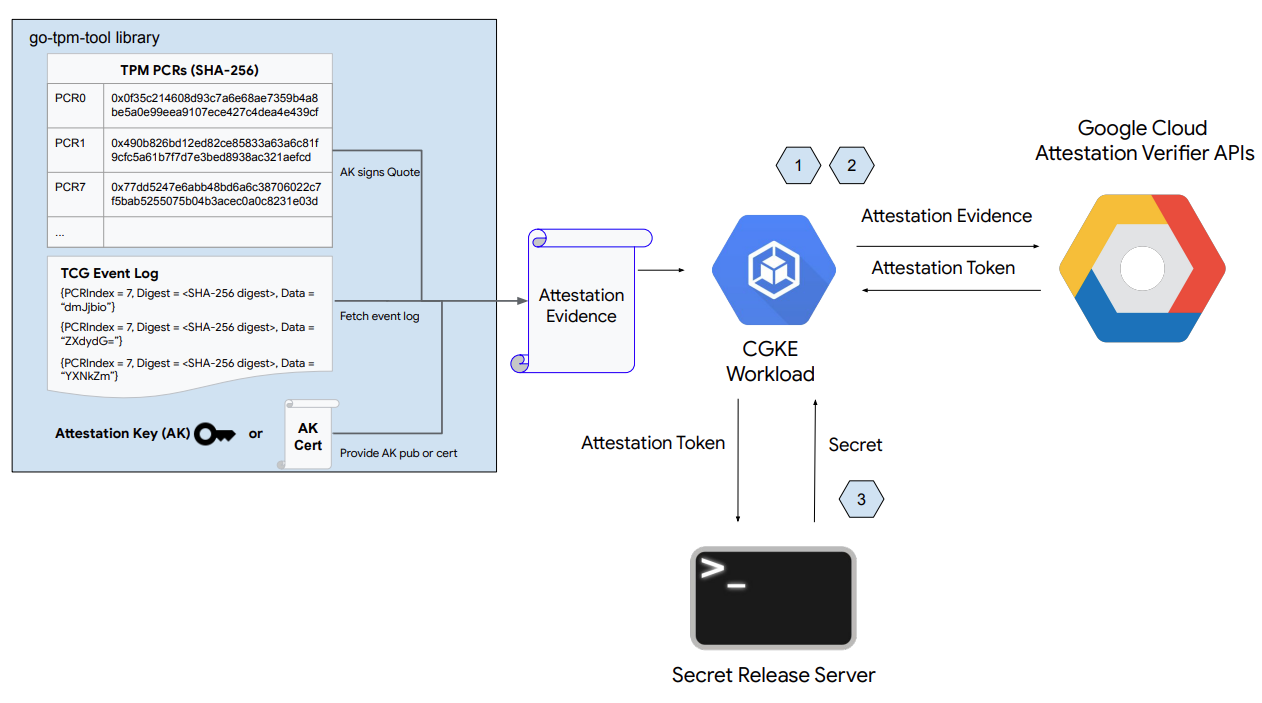
如上圖所示,本程式碼研究室的第一部分包含下列步驟:
- 設定 CGKE 節點,並向所選工作負載公開 vTPM 裝置。
- 部署工作負載,並遠端驗證代管工作負載的 CGKE 節點。
- 部署工作負載,直接從 TDX 或 SEV-SNP 裝置擷取硬體驗證報價。
- 設定 Secret Release 網路伺服器。
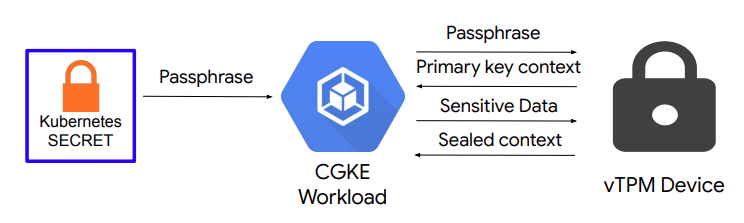
如上圖所示,本程式碼研究室的第二部分包含:
- 在 CGKE 節點上設定 vTPM 授權和 vTPM 密封功能。
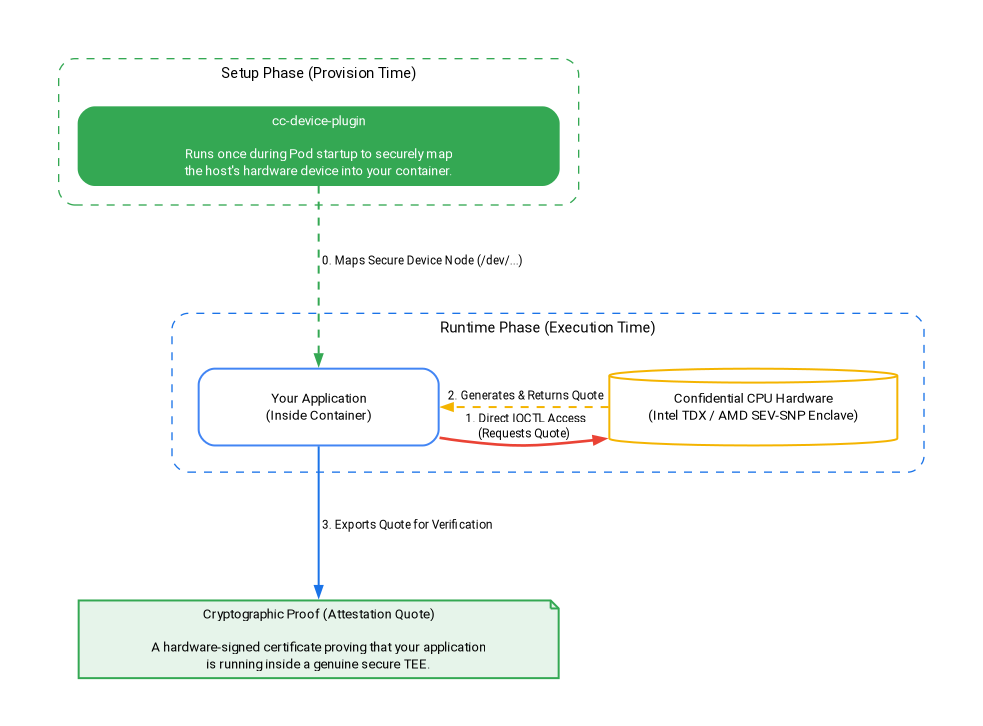
如上圖所示,本程式碼研究室的第三部分包含:
cc-device-plugin如何在設定階段安全地對應硬體裝置。- 在執行階段將工作負載部署至 TDX 或 SEV-SNP 裝置,直接擷取硬體認證引文,完全不會產生額外負擔。
課程內容
- 如何向 CGKE 工作負載公開 vTPM 裝置。
- 如何透過 CGKE 工作負載上的 機密運算 API (認證驗證器服務) 進行遠端認證。
- 如何設定 vTPM 授權,以及執行 vTPM 封存。
- 如何使用
cc-device-plugin存取 CGKE 工作負載中的 SEV-SNP 和 TDX 裝置。 - 如何使用 go-tdx-guest 和 go-sev-guest 擷取硬體驗證引文。
軟硬體需求
- Google Cloud Platform 專案
- 瀏覽器,例如 Chrome 或 Firefox
- Google Compute Engine (程式碼研究室)、機密 VM、機密 GKE 節點和 Artifact Registry 的基本知識
- 如使用 Intel TDX 或 AMD SEV-SNP:最低 GKE 版本為 v1.33.5-gke.1697000+ 或 v1.34.1-gke.2909000+,且須使用適當的機器系列 (TDX 適用 c3,SNP 適用 n2d)。
2. 設定和需求條件
如要啟用必要的 API,請在 Cloud Shell 或本機開發環境中執行下列指令:
gcloud auth login

gcloud services enable \
    cloudapis.googleapis.com \
    cloudshell.googleapis.com \
    container.googleapis.com \
    artifactregistry.googleapis.com \
    confidentialcomputing.googleapis.com \
    iamcredentials.googleapis.com \
    compute.googleapis.com
3. 設定共用 CGKE 控制層
在這個步驟中,您將設定共用的 GKE 控制層和 Artifact Registry Docker 存放區。
1)。設定環境變數並建立共用 GKE 叢集:
將 your-project-id 替換為專案 ID。將 us-central1-c 替換為所需區域。(請參閱「地區與區域」)
export PROJECT_ID="your-project-id"
export ZONE="us-central1-c"
export CLUSTER_NAME="cgke-attestation-codelab"

gcloud config set project ${PROJECT_ID}

gcloud container clusters create ${CLUSTER_NAME} \
    --zone=${ZONE} \
    --num-nodes=1 \
    --machine-type=e2-medium \
    --workload-pool=${PROJECT_ID}.svc.id.goog \
    --workload-metadata=GKE_METADATA

gcloud container clusters get-credentials ${CLUSTER_NAME} --zone=${ZONE}
2)。建立 Artifact Registry Docker 存放區,用於儲存工作負載容器映像檔:
gcloud artifacts repositories create codelab-repo \
    --repository-format=docker \
    --location=us
選擇適合自己的學習方式
共用的 GKE 控制層和 Artifact Registry 存放區現已準備就緒。選擇適合自己的學習方式:
- 選項 1:vTPM 遠端認證和密封 (AMD SEV) - 直接前往設定 CGKE 節點並公開 vTPM 裝置。
- 方法 2:硬體驗證 (Intel TDX 和 AMD SEV-SNP) - 直接跳至部署工作負載以執行硬體驗證。(想探索所有內容嗎?只要完成選項 1,然後依序繼續完成選項 2 即可。
4. 設定 CGKE 節點,並將 vTPM 裝置公開給所選工作負載
在這個步驟中,您會在 CGKE 上建立 vTPM 節點集區,並套用裝置外掛程式,將 CVM vTPM 裝置公開給工作負載。前往 Cloud 控制台或本機開發環境,執行指令。
1)。新增 AMD SEV 節點集區
gcloud container node-pools create sev-pool \
    --cluster=${CLUSTER_NAME} \
    --zone=${ZONE} \
    --machine-type=n2d-standard-2 \
    --num-nodes=1 \
    --enable-confidential-nodes \
    --confidential-node-type=sev
2)。刪除預設節點集區 (選用,但建議這麼做,以節省費用/減少干擾)
gcloud container node-pools delete default-pool \
    --cluster=${CLUSTER_NAME} \
    --zone=${ZONE} \
    --quiet
3). 啟動裝置外掛程式,允許 CGKE 叢集將 vTPM 裝置公開給工作負載。我們會使用 Kubernetes 裝置外掛程式建立新資源 (google.com/cc)。與新資源相關聯的任何工作負載,都能在工作節點上看到裝置。
gcloud container clusters get-credentials ${CLUSTER_NAME} --zone ${ZONE} --project ${PROJECT_ID}

kubectl apply -f https://raw.githubusercontent.com/google/cc-device-plugin/main/manifests/cc-device-plugin.yaml
您可以使用下列指令查看已部署的 cc-device-plugin。
kubectl get pods -A | grep "cc-device-plugin"
注意:如果是混合模式的 GKE 叢集 (同時包含機密和非機密 GKE 工作站節點),建議運算子只將 cc-device-plugin 部署到機密 GKE 工作站節點。
(選用) 套用 CGKE Pod Prometheus 監控功能。開啟監控功能後,即可觀察裝置外掛程式狀態。
kubectl apply -f https://raw.githubusercontent.com/google/cc-device-plugin/main/manifests/cc-device-plugin-pod-monitoring.yaml
前往 https://console.cloud.google.com/monitoring/metrics-explorer,找出 cc-device-plugin 指標或使用 PROMQL。例如,下列 PROMQL 指令會顯示每個 cc-device-plugin 程序的 CPU 秒數。
rate(process_cpu_seconds_total[${__interval}])
5. 部署工作負載,並對工作負載執行遠端認證 (vTPM)
在這個步驟中,您會建立工作負載並部署到上一個步驟建立的 CGKE 叢集,然後執行 vTPM 遠端驗證,在工作站節點上擷取驗證權杖 (OIDC 權杖)。
1)。建立應用程式容器映像檔,並推送至 Artifact Registry。應用程式容器映像檔包含 go-tpm 工具,可收集認證證據並傳送至認證驗證器服務,以取得認證權杖 (OIDC 權杖)。
- 為應用程式容器映像檔建立
Dockerfile。
cat << 'EOF' > Dockerfile
FROM golang:1.26.4 as builder
WORKDIR /
RUN git clone https://github.com/google/go-tpm-tools.git
WORKDIR /go-tpm-tools/cmd/gotpm
RUN CGO_ENABLED=0 GOOS=linux go build -o /gotpm

FROM debian:trixie
WORKDIR /
RUN apt-get update -y
RUN DEBIAN_FRONTEND=noninteractive apt-get install -y ca-certificates curl
RUN rm -rf /etc/apt/sources.list.d
COPY --from=builder /gotpm /gotpm
CMD ["tail", "-f", "/dev/null"]
EOF
- 將應用程式容器映像檔推送至 Artifact Registry。
docker build -t us-docker.pkg.dev/${PROJECT_ID}/codelab-repo/go-tpm:latest .
docker push us-docker.pkg.dev/${PROJECT_ID}/codelab-repo/go-tpm:latest
2)。設定 Kubernetes 服務帳戶,在 GCP 資源上沿用 GCP 服務帳戶的權限。
- 建立 Kubernetes 服務帳戶
codelab-ksa。
kubectl create serviceaccount codelab-ksa \
    --namespace default
- 建立角色
Confidential_Computing_Workload_User,並授予該角色存取機密運算 API 的權限。
gcloud iam roles create Confidential_Computing_Workload_User --project=${PROJECT_ID} \
    --title="CGKE Workload User" --description="Grants the ability to generate an attestation token in a GKE workload." \
    --permissions="confidentialcomputing.challenges.create,confidentialcomputing.challenges.verify,confidentialcomputing.locations.get,confidentialcomputing.locations.list" --stage=GA
- 建立 GCP 服務帳戶
codelab-csa,並繫結至Confidential_Computing_Workload_User角色。這樣codelab-csa才能取得存取機密運算 API 的權限。
gcloud iam service-accounts create codelab-csa \
    --project=${PROJECT_ID}

gcloud projects add-iam-policy-binding ${PROJECT_ID} \
    --member "serviceAccount:codelab-csa@${PROJECT_ID}.iam.gserviceaccount.com" \
    --role "projects/${PROJECT_ID}/roles/Confidential_Computing_Workload_User"

gcloud iam service-accounts add-iam-policy-binding codelab-csa@${PROJECT_ID}.iam.gserviceaccount.com \
    --role roles/iam.workloadIdentityUser \
    --member "serviceAccount:${PROJECT_ID}.svc.id.goog[default/codelab-ksa]"
- 將 Kubernetes 服務帳戶
codelab-ksa繫結至 GCP 服務帳戶codelab-csa。這樣codelab-ksa才能取得存取機密運算 API 的權限。
kubectl annotate serviceaccount codelab-ksa \
    --namespace default \
    iam.gke.io/gcp-service-account=codelab-csa@${PROJECT_ID}.iam.gserviceaccount.com
3). 為示範應用程式建立應用程式部署作業 YAML。將 Kubernetes 服務帳戶 codelab-ksa 指派給選取的工作負載。
cat << EOF > deploy.yaml
apiVersion: v1
kind: Pod
metadata:
  name: go-tpm-demo
  labels:
    app.kubernetes.io/name: go-tpm-demo
spec:
  serviceAccountName: codelab-ksa
  nodeSelector:
    iam.gke.io/gke-metadata-server-enabled: "true"
    cloud.google.com/machine-family: "n2d"
    cloud.google.com/gke-confidential-nodes-instance-type: "SEV"
  containers:
  - name: go-tpm
    image: us-docker.pkg.dev/${PROJECT_ID}/codelab-repo/go-tpm:latest
    resources:
      limits:
        google.com/cc: 1
EOF
4)。將 Deployment 套用至 CGKE 叢集。
kubectl apply -f deploy.yaml
5)。連線至工作負載並啟動遠端驗證,以擷取驗證權杖 (OIDC 權杖)。
kubectl exec -it go-tpm-demo -- /bin/bash
./gotpm token --event-log=/run/cc-device-plugin/binary_bios_measurements > attestation_token
6)。將權杖列印到螢幕上,方便複製。
cat attestation_token
您可以在 jwt.io 中解碼認證權杖,查看聲明。
6. 設定 Secret Release 網路伺服器
在這個步驟中,您會結束先前的 SSH 工作階段,並設定另一個 VM。您會在該 VM 上設定機密發布網路伺服器。網路伺服器會驗證收到的認證權杖及其聲明。如果驗證成功,系統就會將密鑰傳送給要求者。
1)。前往 Cloud 控制台或本機開發環境。建立虛擬機器。
gcloud config set project ${PROJECT_ID}

gcloud compute instances create cgke-attestation-codelab-web-server \
    --machine-type=n2d-standard-2 \
    --zone=${ZONE} \
    --image-family=ubuntu-2204-lts \
    --image-project=ubuntu-os-cloud
2)。透過 SSH 連線至新的 VM。
gcloud compute ssh --zone ${ZONE} cgke-attestation-codelab-web-server
3). 設定 Go 環境。
wget https://go.dev/dl/go1.26.4.linux-amd64.tar.gz
sudo tar -C /usr/local -xzf go1.26.4.linux-amd64.tar.gz
export PATH=$PATH:/usr/local/go/bin
4)。建立下列兩個檔案,儲存密鑰發布網路伺服器的原始碼。
建立 main.go:
cat << 'EOF' > main.go
package main

import (
	"fmt"
	"net/http"
	"strings"
	"time"
	"log"

	"github.com/golang-jwt/jwt/v4"
)

const (
	theSecret = "This is the super secret information!"
)

func homePage(w http.ResponseWriter, r *http.Request) {
	tokenString := r.Header.Get("Authorization")
	if tokenString != "" {
		tokenString, err := extractToken(tokenString)
		if err != nil {
			http.Error(w, err.Error(), http.StatusUnauthorized)
		}

		tokenBytes := []byte(tokenString)
		// A method to return a public key from the well-known endpoint
		keyFunc := getRSAPublicKeyFromJWKsFile

		token, err := decodeAndValidateToken(tokenBytes, keyFunc)
		if err != nil {
			http.Error(w, "Invalid JWT Token", http.StatusUnauthorized)
		}

		if ok, err := isValid(token.Claims.(jwt.MapClaims)); ok {
			fmt.Fprintln(w, theSecret)
		} else {
			if err != nil {
				http.Error(w, "Error validating JWT claims: "+err.Error(), http.StatusUnauthorized)
			} else {
				http.Error(w, "Invalid JWT token Claims", http.StatusUnauthorized)
			}
		}
	} else {
		http.Error(w, "Authorization token required", http.StatusUnauthorized)
	}
}

func extractToken(tokenString string) (string, error) {
	if strings.HasPrefix(tokenString, "Bearer ") {
		return strings.TrimPrefix(tokenString, "Bearer "), nil
	}
	return "", fmt.Errorf("invalid token format")
}

func isValid(claims jwt.MapClaims) (bool, error) {
	// 1. Evaluating Standard Claims:
	subject, ok := claims["sub"].(string)
	if !ok {
		return false, fmt.Errorf("missing or invalid 'sub' claim")
	}
	fmt.Println("Subject:", subject)

	issuedAt, ok := claims["iat"].(float64)
	if !ok {
		return false, fmt.Errorf("missing or invalid 'iat' claim")
	}
	fmt.Println("Issued At:", time.Unix(int64(issuedAt), 0))

	// 2. Evaluating Remote Attestation Claims:
	hwModel, ok := claims["hwmodel"].(string)
	// Support attestation of both AMD SEV and Intel TDX
	if !ok || (hwModel != "GCP_AMD_SEV" && hwModel != "GCP_INTEL_TDX") {
		return false, fmt.Errorf("missing or invalid 'hwModel': %v", hwModel)
	}
	fmt.Println("hwmodel:", hwModel)

	swName, ok := claims["swname"].(string)
	if !ok || swName != "GCE" {
		return false, fmt.Errorf("missing or invalid 'swName'")
	}
	fmt.Println("swname:", swName)

	return true, nil
}


func main() {
	http.HandleFunc("/", homePage)
	fmt.Println("Server listening on :8080")
	err := http.ListenAndServe(":8080", nil)
	if err != nil {
		log.Fatalf("Server failed to start: %v", err)
	}
}
EOF
建立 helper.go:
cat << 'EOF' > helper.go
package main

import (
	"crypto/rsa"
	"encoding/base64"
	"encoding/json"
	"errors"
	"fmt"
	"io"
	"math/big"
	"net/http"

	"github.com/golang-jwt/jwt/v4"
)

const (
	socketPath     = "/run/container_launcher/teeserver.sock"
	expectedIssuer = "https://confidentialcomputing.googleapis.com"
	wellKnownPath  = "/.well-known/openid-configuration"
)

type jwksFile struct {
	Keys []jwk `json:"keys"`
}

type jwk struct {
	N   string `json:"n"`   // "nMMTBwJ7H6Id8zUCZd-L7uoNyz9b7lvoyse9izD9l2rtOhWLWbiG-7pKeYJyHeEpilHP4KdQMfUo8JCwhd-OMW0be_XtEu3jXEFjuq2YnPSPFk326eTfENtUc6qJohyMnfKkcOcY_kTE11jM81-fsqtBKjO_KiSkcmAO4wJJb8pHOjue3JCP09ZANL1uN4TuxbM2ibcyf25ODt3WQn54SRQTV0wn098Y5VDU-dzyeKYBNfL14iP0LiXBRfHd4YtEaGV9SBUuVhXdhx1eF0efztCNNz0GSLS2AEPLQduVuFoUImP4s51YdO9TPeeQ3hI8aGpOdC0syxmZ7LsL0rHE1Q",
	E   string `json:"e"`   // "AQAB" or 65537 as an int
	Kid string `json:"kid"` // "1f12fa916c3a0ef585894b4b420ad17dc9d6cdf5",

	// Unused fields:
	// Alg string `json:"alg"` // "RS256",
	// Kty string `json:"kty"` // "RSA",
	// Use string `json:"use"` // "sig",
}

type wellKnown struct {
	JwksURI string `json:"jwks_uri"` // "https://www.googleapis.com/service_accounts/v1/metadata/jwk/signer@confidentialspace-sign.iam.gserviceaccount.com"

	// Unused fields:
	// Iss                                   string `json:"issuer"`                                // "https://confidentialcomputing.googleapis.com"
	// Subject_types_supported               string `json:"subject_types_supported"`               // [ "public" ]
	// Response_types_supported              string `json:"response_types_supported"`              // [ "id_token" ]
	// Claims_supported                      string `json:"claims_supported"`                      // [ "sub", "aud", "exp", "iat", "iss", "jti", "nbf", "dbgstat", "eat_nonce", "google_service_accounts", "hwmodel", "oemid", "secboot", "submods", "swname", "swversion" ]
	// Id_token_signing_alg_values_supported string `json:"id_token_signing_alg_values_supported"` // [ "RS256" ]
	// Scopes_supported                      string `json:"scopes_supported"`                      // [ "openid" ]
}

func getWellKnownFile() (wellKnown, error) {
	httpClient := http.Client{}
	resp, err := httpClient.Get(expectedIssuer + wellKnownPath)
	if err != nil {
		return wellKnown{}, fmt.Errorf("failed to get raw .well-known response: %w", err)
	}

	wellKnownJSON, err := io.ReadAll(resp.Body)
	if err != nil {
		return wellKnown{}, fmt.Errorf("failed to read .well-known response: %w", err)
	}

	wk := wellKnown{}
	json.Unmarshal(wellKnownJSON, &wk)
	return wk, nil
}

func getJWKFile() (jwksFile, error) {
	wk, err := getWellKnownFile()
	if err != nil {
		return jwksFile{}, fmt.Errorf("failed to get .well-known json: %w", err)
	}

	// Get JWK URI from .wellknown
	uri := wk.JwksURI
	fmt.Printf("jwks URI: %v\n", uri)

	httpClient := http.Client{}
	resp, err := httpClient.Get(uri)
	if err != nil {
		return jwksFile{}, fmt.Errorf("failed to get raw JWK response: %w", err)
	}

	jwkbytes, err := io.ReadAll(resp.Body)
	if err != nil {
		return jwksFile{}, fmt.Errorf("failed to read JWK body: %w", err)
	}

	file := jwksFile{}
	err = json.Unmarshal(jwkbytes, &file)
	if err != nil {
		return jwksFile{}, fmt.Errorf("failed to unmarshall JWK content: %w", err)
	}

	return file, nil
}

// N and E are 'base64urlUInt' encoded: https://www.rfc-editor.org/rfc/rfc7518#section-6.3
func base64urlUIntDecode(s string) (*big.Int, error) {
	b, err := base64.RawURLEncoding.DecodeString(s)
	if err != nil {
		return nil, err
	}
	z := new(big.Int)
	z.SetBytes(b)
	return z, nil
}

func getRSAPublicKeyFromJWKsFile(t *jwt.Token) (any, error) {
	keysfile, err := getJWKFile()
	if err != nil {
		return nil, fmt.Errorf("failed to fetch the JWK file: %w", err)
	}

	// Multiple keys are present in this endpoint to allow for key rotation.
	// This method finds the key that was used for signing to pass to the validator.
	kid := t.Header["kid"]
	for _, key := range keysfile.Keys {
		if key.Kid != kid {
			continue // Select the key used for signing
		}

		n, err := base64urlUIntDecode(key.N)
		if err != nil {
			return nil, fmt.Errorf("failed to decode key.N %w", err)
		}
		e, err := base64urlUIntDecode(key.E)
		if err != nil {
			return nil, fmt.Errorf("failed to decode key.E %w", err)
		}

		// The parser expects an rsa.PublicKey: https://github.com/golang-jwt/jwt/blob/main/rsa.go#L53
		// or an array of keys. We chose to show passing a single key in this example as its possible
		// not all validators accept multiple keys for validation.
		return &rsa.PublicKey{
			N: n,
			E: int(e.Int64()),
		}, nil
	}

	return nil, fmt.Errorf("failed to find key with kid '%v' from well-known endpoint", kid)
}

func decodeAndValidateToken(tokenBytes []byte, keyFunc func(t *jwt.Token) (any, error)) (*jwt.Token, error) {
	var err error
	fmt.Println("Unmarshalling token and checking its validity...")
	token, err := jwt.NewParser().Parse(string(tokenBytes), keyFunc)

	fmt.Printf("Token valid: %v\n", token.Valid)
	if token.Valid {
		return token, nil
	}
	if ve, ok := err.(*jwt.ValidationError); ok {
		if ve.Errors&jwt.ValidationErrorMalformed != 0 {
			return nil, fmt.Errorf("token format invalid. Please contact the Confidential Space team for assistance")
		}
		if ve.Errors&(jwt.ValidationErrorNotValidYet) != 0 {
			// If device time is not synchronized with the Attestation Service you may need to account for that here.
			return nil, errors.New("token is not active yet")
		}
		if ve.Errors&(jwt.ValidationErrorExpired) != 0 {
			return nil, fmt.Errorf("token is expired")
		}
		return nil, fmt.Errorf("unknown validation error: %v", err)
	}

	return nil, fmt.Errorf("couldn't handle this token or couldn't read a validation error: %v", err)
}
EOF
5)。執行下列指令,建構並執行網路伺服器。這會在通訊埠 :8080 啟動密鑰發布網路伺服器。
go mod init google.com/codelab
go mod tidy
go get github.com/golang-jwt/jwt/v4
go build
./codelab
疑難排解:執行 go mod tidy 時,您可能會看到下列警告訊息,可以忽略:
go: finding module for package github.com/golang-jwt/jwt/v4
go: downloading github.com/golang-jwt/jwt v3.2.2+incompatible
go: downloading github.com/golang-jwt/jwt/v4 v4.5.0
go: found github.com/golang-jwt/jwt/v4 in github.com/golang-jwt/jwt/v4 v4.5.0
go: google.com/codelab/go/pkg/mod/github.com/golang-jwt/jwt@v3.2.2+incompatible: import path "google.com/codelab/go/pkg/mod/github.com/golang-jwt/jwt@v3.2.2+incompatible" should not have @version
go: google.com/codelab/go/pkg/mod/github.com/golang-jwt/jwt@v3.2.2+incompatible/cmd/jwt: import path "google.com/codelab/go/pkg/mod/github.com/golang-jwt/jwt@v3.2.2+incompatible/cmd/jwt" should not have @version
go: google.com/codelab/go/pkg/mod/github.com/golang-jwt/jwt@v3.2.2+incompatible/request: import path "google.com/codelab/go/pkg/mod/github.com/golang-jwt/jwt@v3.2.2+incompatible/request" should not have @version
go: google.com/codelab/go/pkg/mod/github.com/golang-jwt/jwt@v3.2.2+incompatible/test: import path "google.com/codelab/go/pkg/mod/github.com/golang-jwt/jwt@v3.2.2+incompatible/test" should not have @version
6)。啟動另一個 Cloud Shell 分頁或本機開發環境工作階段,然後執行下列指令。這樣就能取得 cgke-attestation-codelab-web-server-internal-ip。
gcloud compute instances describe cgke-attestation-codelab-web-server \
    --format='get(networkInterfaces[0].networkIP)' \
    --zone=${ZONE}
7)。連線至 CGKE 工作負載,並啟動遠端驗證來擷取驗證權杖 (OIDC 權杖)。然後在下列指令中嵌入 attestation-token 和 cgke-attestation-codelab-web-server-internal-ip 的內容。這會擷取密鑰發布網路伺服器持有的密鑰!
kubectl exec -it go-tpm-demo -- /bin/bash
./gotpm token --event-log=/run/cc-device-plugin/binary_bios_measurements > attestation_token
curl http://<cgke-attestation-codelab-web-server-internal-ip>:8080 -H "Authorization: Bearer $(cat ./attestation_token)"
更改下列內容:
cgke-attestation-codelab-web-server-internal-ip是cgke-attestation-codelab-web-serverVM 執行個體的內部 IP。
7. CGKE 節點的 vTPM 密封功能
在這個步驟中,您會在 CGKE 節點上設定 vTPM 擁有者授權,並使用 vTPM 擁有者密碼片語部署工作負載。接著,您會建立 vTPM 主金鑰,透過 vTPM 封存功能封存及解除封存工作負載中的資料。
1)。在 CGKE 節點上設定 vTPM 擁有者授權。
- 建立一次性工作容器映像檔。這項一次性工作會為所有 vTPM 設定擁有者密碼。以下是建立容器映像檔的
Dockerfile。
cat << 'EOF' > Dockerfile
FROM debian:latest

RUN echo 'debconf debconf/frontend select Noninteractive' | debconf-set-selections
RUN apt-get update

RUN apt -y install \
  autoconf-archive \
  libcmocka0 \
  libcmocka-dev \
  net-tools \
  build-essential \
  git \
  pkg-config \
  gcc \
  g++ \
  m4 \
  libtool \
  automake \
  libgcrypt20-dev \
  libssl-dev \
  uthash-dev \
  autoconf \
  uuid-dev \
  libcurl4-openssl-dev \
  libjson-c-dev

RUN mkdir /src

WORKDIR /src
RUN git clone https://github.com/tpm2-software/tpm2-tss
WORKDIR /src/tpm2-tss
RUN ./bootstrap
RUN ./configure --prefix=/usr/local
RUN make all install

WORKDIR /src
RUN git clone https://github.com/tpm2-software/tpm2-tools
WORKDIR /src/tpm2-tools
RUN apt-get -y install libcurl4 libcurl4-openssl-dev pandoc man-db
RUN ./bootstrap
RUN ./configure --prefix=/usr/local
RUN make all install

RUN apt-get -y install vim

ENTRYPOINT ["/bin/bash"]
EOF
- 建構一次性作業容器映像檔,並推送至 Artifact Registry。
docker build -t us-docker.pkg.dev/${PROJECT_ID}/codelab-repo/tpm-tools:latest .
docker push us-docker.pkg.dev/${PROJECT_ID}/codelab-repo/tpm-tools:latest
- 透過 Kubernetes 工作執行一次性工作。(警告:這項工作會清除每個 CVM 上的 vTPM,如果 CVM 使用 vTPM 加密磁碟,這項工作會導致 CVM 在重新啟動後無法使用。你可以使用
lsblk -f指令檢查磁碟是否具有 FSTYPEcrypto_LUKS)
cat << EOF > tpm-tools-task.yaml
apiVersion: batch/v1
kind: Job
metadata:
  name: tpm-tools-task
spec:
  template:
    spec:
      nodeSelector:
        cloud.google.com/machine-family: "n2d"
        cloud.google.com/gke-confidential-nodes-instance-type: "SEV"
      containers:
      - name: tpm-tools
        image: us-docker.pkg.dev/${PROJECT_ID}/codelab-repo/tpm-tools:latest
        command: ["/bin/sh", "-c"]
        args: ["tpm2_clear; tpm2_changeauth -c owner this_is_passphrase"]
        resources:
          limits:
            google.com/cc: 1
      restartPolicy: Never
EOF
提示:如需重新執行 tpm-tools-task 工作,請務必先刪除現有工作:
kubectl delete job tpm-tools-task
- 啟動一次性工作。這項工作會在所有 worker 節點上設定 vTPM 擁有者通關密語。
kubectl apply -f tpm-tools-task.yaml
2)。建立 Kubernetes 密鑰,保存 vTPM 擁有者通關密語。
kubectl create secret generic tpm-secret --from-literal=passphrase='this_is_passphrase'
3). 建立示範應用程式容器,並將通關密語傳遞至該容器。這個範例應用程式容器包含 tpm2-tools,可與 vTPM 互動。
- 為範例應用程式容器建立部署作業 YAML 檔案。
cat << EOF > deploy_demo.yaml
apiVersion: v1
kind: Pod
metadata:
  name: tpm-tools-demo
  labels:
    app.kubernetes.io/name: tpm-tools-demo
spec:
  nodeSelector:
    cloud.google.com/machine-family: "n2d"
    cloud.google.com/gke-confidential-nodes-instance-type: "SEV"
  containers:
  - name: tpm-tools
    image: us-docker.pkg.dev/${PROJECT_ID}/codelab-repo/tpm-tools:latest
    command: ["tail", "-f", "/dev/null"]
    resources:
      limits:
        google.com/cc: 1
    volumeMounts:
      - name: secret-volume
        mountPath: "/etc/tpmsecret"
        readOnly: true
  volumes:
    - name: secret-volume
      secret:
        secretName: tpm-secret
EOF
- 部署示範應用程式。
kubectl apply -f deploy_demo.yaml
4)。在示範應用程式容器中執行 vTPM 密封作業。
- 連線至試用版應用程式容器,並使用密碼設定主金鑰。
kubectl exec -it tpm-tools-demo -- /bin/bash
tpm2_createprimary -C o -c primary.ctx -P $(cat /etc/tpmsecret/passphrase)
tpm2_createprimary 會與 vTPM 互動,根據指定的階層和範本產生主要物件。
- -C o:表示主鍵將在 TPM 的擁有者階層下建立。
- -c
primary.ctx:將所建立主要物件的內容 (控制代碼和相關聯的資料) 儲存至primary.ctx檔案。這個脈絡對於後續作業至關重要。
工作負載無法使用錯誤的擁有者密碼片語建立主鍵。
tpm2_createprimary -C o -P wrong_passphrase
指令會傳回下列錯誤:
WARNING:esys:src/tss2-esys/api/Esys_CreatePrimary.c:401:Esys_CreatePrimary_Finish() Received TPM Error
ERROR:esys:src/tss2-esys/api/Esys_CreatePrimary.c:135:Esys_CreatePrimary() Esys Finish ErrorCode (0x000009a2)
ERROR: Esys_CreatePrimary(0x9A2) - tpm:session(1):authorization failure without DA implications
ERROR: Unable to run tpm2_createprimary
- 建立主要金鑰後,即可用於密封及解除密封資料。
echo "This is my secret message" > secret.txt
tpm2_create -C primary.ctx -u sealed.pub -r sealed.priv -i secret.txt
tpm2_load -C primary.ctx -u sealed.pub -r sealed.priv -c sealed.ctx
tpm2_unseal -c sealed.ctx -o unsealed.txt
cat unsealed.txt
tpm2_create 會與 vTPM 互動,產生所需的密碼編譯物件。
- -C
primary.ctx:使用我們稍早建立的主鍵內容。 - -u
sealed.pub:將密封金鑰的公開部分 (解封時需要) 儲存在sealed.pub中。 - -r
sealed.priv:將密封金鑰的私密部分儲存在sealed.priv中。 - -i
secret.txt:包含要密封的密鑰的檔案。
tpm2_load:使用公開和私密部分 (sealed.pub、sealed.priv) 將密封金鑰載入 TPM,並將其內容儲存至 sealed.ctx。
tpm2_unseal:解密 (解除密封) 先前使用 vTPM 密封物件加密 (密封) 的資料。
cat unsealed.txt:顯示未密封的密文,確認程序是否成功。
請注意,primary.ctx 和 sealed.priv 檔案只能用於一部 vTPM 裝置。只要有權存取 vTPM 裝置和這些檔案,就能存取密封資料。您可以進一步使用 PCR 值政策密封資料,但這不在本程式碼研究室的範圍內。
8. 部署工作負載以執行硬體驗證:Intel TDX 和 AMD SEV-SNP
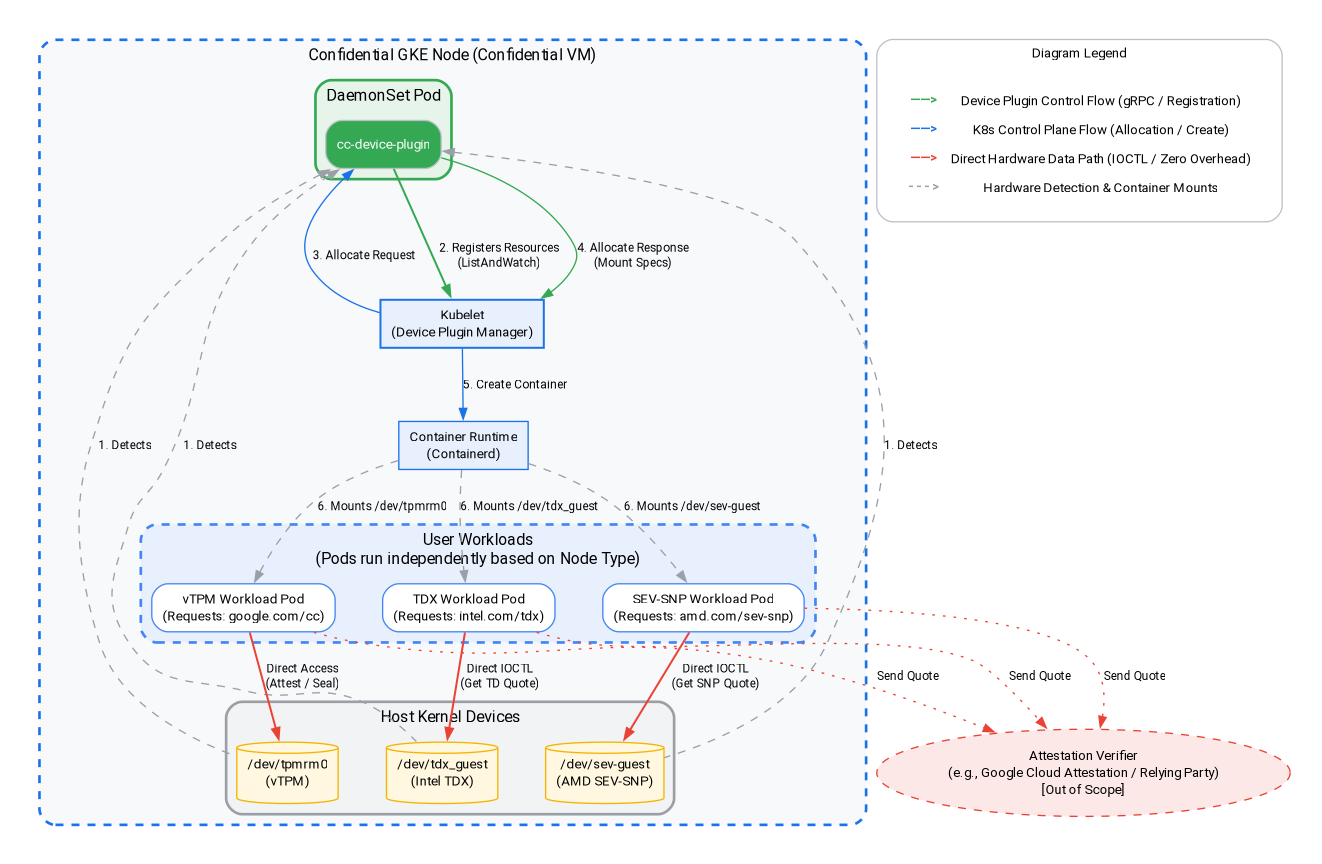
在這個步驟中,您會建立以 Intel TDX 或 AMD SEV-SNP 為基礎的工作負載,並在機密 GKE 節點上執行硬體層級的認證。如上方的架構圖所示,我們會使用訪客裝置外掛程式,擷取 Intel TDX 和 AMD SEV-SNP 架構的認證引文。前往 Cloud 控制台或本機開發環境,執行指令。
挑選要測試的機密運算架構,例如 Intel TDX 或 AMD SEV-SNP。
1)。新增 Intel TDX 節點集區
gcloud container node-pools create tdx-pool \
    --cluster=${CLUSTER_NAME} \
    --zone=${ZONE} \
    --machine-type=c3-standard-4 \
    --num-nodes=1 \
    --enable-confidential-nodes \
    --confidential-node-type=tdx
2)。新增 AMD SEV-SNP 節點集區
gcloud container node-pools create snp-pool \
    --cluster=${CLUSTER_NAME} \
    --zone=${ZONE} \
    --machine-type=n2d-standard-2 \
    --num-nodes=1 \
    --enable-confidential-nodes \
    --confidential-node-type=sev_snp \
    --min-cpu-platform="AMD Milan"
3). 刪除預設節點集區 (選用,但建議這麼做,以節省費用/減少干擾)
gcloud container node-pools delete default-pool \
    --cluster=${CLUSTER_NAME} \
    --zone=${ZONE} \
    --quiet
(注意:如果您先前已完成 vTPM 區段,這個集區已遭刪除,您可以放心地忽略這裡的任何「找不到」錯誤。)
4)。啟動裝置外掛程式,允許 CGKE 叢集將硬體驗證訪客裝置公開給工作負載。我們使用 Kubernetes 裝置外掛程式建立新資源 (intel.com/tdx 和 amd.com/sev-snp)。與這些資源相關聯的任何工作負載,都能存取 worker 節點上的訪客裝置。
gcloud container clusters get-credentials ${CLUSTER_NAME} --zone ${ZONE} --project ${PROJECT_ID}

kubectl apply -f https://raw.githubusercontent.com/google/cc-device-plugin/main/manifests/cc-device-plugin.yaml
您可以使用下列指令查看已部署的 cc-device-plugin。
kubectl get pods -A | grep "cc-device-plugin"
注意:如果是混合模式的 GKE 叢集 (同時包含機密和非機密 GKE 工作站節點),建議運算子只將 cc-device-plugin 部署至機密 GKE 工作站節點。
9. 硬體驗證:Intel TDX 和 AMD SEV-SNP
在本節中,您將瞭解如何使用客層裝置外掛程式,擷取 Intel TDX 和 AMD SEV-SNP 架構的驗證引號,在 Confidential GKE 節點內執行硬體層級的驗證。
1)。建立 Go 應用程式,從對應的訪客裝置擷取硬體認證引文。
cat << 'EOF' > main.go
package main

import (
	"crypto/rand"
	"log"
	"os"
	"strconv"
	"time"
	"unsafe"

	sevclient "github.com/google/go-sev-guest/client"
	"golang.org/x/sys/unix"
)

// TDX Linux ABI Definitions
const (
	iocTdxGetReport = 0xc4405401
)

type tdxReportReq struct {
	ReportData [64]byte
	TdReport   [1024]byte
}

func main() {
	ccType := os.Getenv("CC_TYPE") // Expected "tdx" or "snp"

	iterationsStr := os.Getenv("ITERATIONS")
	iterations := 100
	if val, err := strconv.Atoi(iterationsStr); err == nil && val > 0 {
		iterations = val
	}

	successCount := 0
	failureCount := 0
	startTime := time.Now()

	log.Printf("Starting Attestation test for CC_TYPE: %s (iterations: %d)", ccType, iterations)

	if ccType == "tdx" {
		devicePath := "/dev/tdx_guest"
		file, err := os.OpenFile(devicePath, os.O_RDWR|os.O_SYNC, 0)
		if err != nil {
			log.Fatalf("FATAL: Failed to open %s: %v", devicePath, err)
		}
		defer file.Close()

		for i := 1; i <= iterations; i++ {
			var reportData [64]byte
			rand.Read(reportData[:])
			req := tdxReportReq{ReportData: reportData}

			_, _, errno := unix.Syscall(unix.SYS_IOCTL, file.Fd(), uintptr(iocTdxGetReport), uintptr(unsafe.Pointer(&req)))
			if errno != 0 || (req.TdReport[0] == 0 && req.TdReport[10] == 0) {
				failureCount++
			} else {
				successCount++
			}
		}
	} else if ccType == "snp" {
		device, err := sevclient.OpenDevice()
		if err != nil {
			log.Fatalf("FATAL: Failed to open SEV-SNP device: %v", err)
		}
		defer device.Close()

		for i := 1; i <= iterations; i++ {
			var reportData [64]byte
			rand.Read(reportData[:])
			report, err := sevclient.GetRawReport(device, reportData)
			if err != nil || len(report) == 0 {
				failureCount++
			} else {
				successCount++
			}
		}
	}

	elapsed := time.Since(startTime)
	log.Printf("=== Test Completed ===")
	log.Printf("Total Iterations: %d", iterations)
	log.Printf("Success: %d, Failures: %d", successCount, failureCount)
	log.Printf("Total Time: %s", elapsed)
}
EOF
2)。為硬體驗證測試工具建立 Dockerfile:
cat << 'EOF' > Dockerfile
FROM golang:1.26.4 AS builder
WORKDIR /app
COPY main.go .
RUN go mod init cc-attestation
RUN go mod tidy
RUN CGO_ENABLED=0 GOOS=linux go build -o /cc-attestation-check main.go

FROM ubuntu:22.04
COPY --from=builder /cc-attestation-check /usr/local/bin/
CMD ["/usr/local/bin/cc-attestation-check"]
EOF
3). 建構映像檔並推送至 Artifact Registry:
docker build -t us-docker.pkg.dev/${PROJECT_ID}/codelab-repo/cc-attestation-check:latest .
docker push us-docker.pkg.dev/${PROJECT_ID}/codelab-repo/cc-attestation-check:latest
4)。為 Intel TDX 和 AMD SEV-SNP 工作負載建立應用程式部署作業 YAML,以公開硬體裝置。
- 如為 Intel TDX 工作負載,請建立下列部署作業 YAML:
cat << EOF > deploy-tdx.yaml
apiVersion: v1
kind: Pod
metadata:
  name: tdx-attestation-pod
spec:
  restartPolicy: Never
  containers:
  - name: tdx-container
    image: us-docker.pkg.dev/${PROJECT_ID}/codelab-repo/cc-attestation-check:latest
    env:
    - name: CC_TYPE
      value: "tdx"
    - name: ITERATIONS
      value: "1000"
    resources:
      limits:
        intel.com/tdx: 1
  nodeSelector:
    cloud.google.com/gke-confidential-nodes-instance-type: "TDX"
    cloud.google.com/machine-family: "c3"
EOF
- 針對 AMD SEV-SNP 工作負載,請建立下列部署 YAML:
cat << EOF > deploy-snp.yaml
apiVersion: v1
kind: Pod
metadata:
  name: snp-attestation-pod
spec:
  restartPolicy: Never
  containers:
  - name: snp-container
    image: us-docker.pkg.dev/${PROJECT_ID}/codelab-repo/cc-attestation-check:latest
    env:
    - name: CC_TYPE
      value: "snp"
    - name: ITERATIONS
      value: "100"
    resources:
      limits:
        amd.com/sev-snp: 1
  nodeSelector:
    cloud.google.com/gke-confidential-nodes-instance-type: "SEV_SNP"
    cloud.google.com/machine-family: "n2d"
EOF
5)。將部署項目套用至 CGKE 叢集。
kubectl apply -f deploy-tdx.yaml
kubectl apply -f deploy-snp.yaml
6)。等待 Pod 完成,然後驗證硬體認證記錄。
首先,請檢查 Pod 的狀態,確保 Pod 已成功排定並執行 (請等到顯示「已完成」或「執行中」):
kubectl get pods -w
Pod 準備就緒後,請檢查記錄,確認是否已成功擷取硬體驗證引文:
# View the TDX attestation logs
kubectl logs tdx-attestation-pod

# View the SEV-SNP attestation logs
kubectl logs snp-attestation-pod
(您會看到記錄的總執行時間、總疊代次數,以及成功/失敗次數)。
10. 清除
為避免系統持續向您的 Google Cloud 帳戶收費,請務必刪除本程式碼研究室建立的資源。
在 Cloud Shell 或本機開發環境中執行下列指令。
1)。設定環境變數:
export PROJECT_ID="your-project-id"
export ZONE="us-central1-c"
export CLUSTER_NAME="cgke-attestation-codelab"

gcloud config set project ${PROJECT_ID}
2)。刪除 GKE 資源
gcloud container clusters delete ${CLUSTER_NAME} \
    --zone=${ZONE} \
    --quiet
3). 刪除 Artifact Registry
gcloud artifacts repositories delete codelab-repo \
    --location=us \
    --quiet
4)。刪除網頁伺服器 VM
gcloud compute instances delete cgke-attestation-codelab-web-server \
    --zone=${ZONE}
5)。刪除 IAM 資源
# Delete the GCP service account
gcloud iam service-accounts delete codelab-csa@${PROJECT_ID}.iam.gserviceaccount.com \
    --quiet

# Delete the custom IAM role
gcloud iam roles delete Confidential_Computing_Workload_User \
    --project=${PROJECT_ID} \
    --quiet
11. 後續步驟
進一步瞭解機密 GKE 節點。